Google Tag Manager Update: Google Tag Will Load First Starting April 2025

Google has announced an important update to Google Tag Manager (GTM) that will change how it interacts with Google Ads and Floodlight tags. Starting April 10, 2025, GTM containers will automatically load a Google tag before firing events, improving tracking accuracy and data collection.

This change aims to provide advertisers with more reliable measurement data, enhanced tracking capabilities, and easier access to key features like Enhanced Conversions and Cross-domain tracking. In this article, we will explore what’s changing, why it matters, and what advertisers need to do to prepare.

What’s Changing in Google Tag Manager?

The key update focuses on how Google tags are loaded in GTM containers. Previously, event tracking could be triggered before a Google tag was fully loaded, potentially leading to incomplete or inaccurate data collection.

1. Google Tag Will Load First

  • GTM containers that include Google Ads and Floodlight tags will now automatically load a Google tag first before sending tracking events.
  • This ensures that all event data is properly attributed, improving tracking reliability and measurement accuracy.

2. Easier Access to Key Features

  • Users can now activate Enhanced Conversions, Cross-domain tracking, and Autoevents directly from the Google tag settings page.
  • These features help improve conversion tracking and user journey analysis across multiple platforms.

3. Improved Data Collection and Compliance

  • If users have agreed to Google’s Customer Data Terms of Service, GTM will automatically enable “User Provided Data” collection.
  • This ensures that data collection settings are applied consistently across all events, whether sent via GTM or in-page code.

Why This Update Matters

1. More Accurate Tracking and Reporting

  • Loading the Google tag first ensures that all event data is correctly attributed, reducing data discrepancies in Google Ads reporting.
  • Advertisers can expect better conversion tracking and improved attribution modeling.

2. Streamlined Feature Access

  • Advertisers will no longer need to manually configure tracking settings for Enhanced Conversions and Cross-domain tracking.
  • These features will now be easily accessible through the Google tag settings page.

3. Compliance and Data Privacy Improvements

  • Enabling User Provided Data collection automatically helps advertisers stay compliant with Google’s data policies.
  • This change reduces the risk of missing user data and enhances tracking across platforms.

What Advertisers Need to Do

1. Add a Google Tag to GTM

  • Google recommends adding a Google tag to your GTM container to preview how these changes will affect your tracking.
  • This allows you to test and adjust settings before the automatic update on April 10, 2025.

2. Review Tracking Settings

  • Ensure that Enhanced Conversions and Cross-domain tracking are enabled in your Google tag settings.
  • Check that User Provided Data collection is properly configured if your business relies on customer data tracking.

3. Monitor Performance Post-Update

  • After April 10, track ad performance and conversion data to ensure the new Google tag behavior is functioning as expected.
  • Contact Google support or your account management team if any issues arise.

Final Thoughts

Google’s update to Google Tag Manager is designed to enhance tracking accuracy, simplify feature access, and improve data collection reliability. By ensuring that the Google tag loads before sending events, advertisers can expect more accurate measurement data and better campaign insights.

While this update is expected to streamline tracking, it’s important for advertisers to test the changes beforehand and ensure their Google tag settings are optimized. As Google continues refining its tracking technologies, staying updated with these changes will be crucial for maximizing ad performance and ROI.


Frequently Asked Questions (FAQs)

1. What is changing in Google Tag Manager?

Starting April 10, 2025, GTM containers with Google Ads and Floodlight tags will automatically load a Google tag first before firing events, improving tracking accuracy.

2. Do I need to manually update my GTM settings?

No, the update will be applied automatically. However, Google recommends adding a Google tag to your GTM container to preview the changes before April 10.

3. How does this affect data collection?

With this update, User Provided Data collection will be automatically enabled if you have agreed to Google’s Customer Data Terms of Service, ensuring better data consistency.

4. Will this impact conversion tracking?

Yes, this update is expected to improve conversion tracking accuracy by ensuring that Google tags are properly loaded before tracking events are sent.

5. Who should take action before April 10?

Advertisers using Google Tag Manager for Google Ads tracking should review their tracking setup and test the changes to ensure they align with business objectives.

Google Calendar Malware Is on the Rise – How to Stay Safe

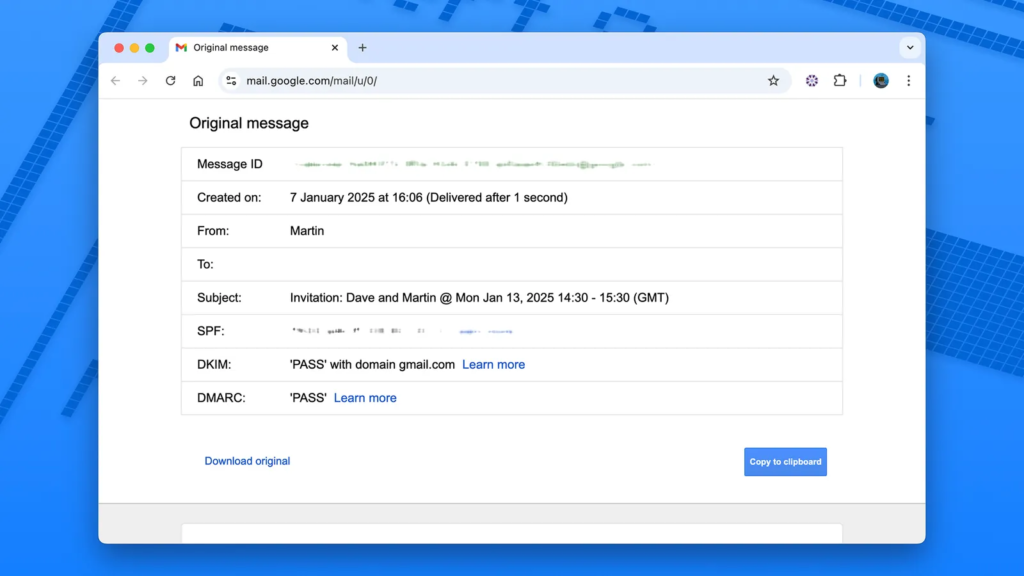
Google Calendar is a widely used tool for scheduling and managing daily tasks. However, cybercriminals have found new ways to exploit it, turning it into a potential gateway for malware and phishing scams. Recent reports indicate a rise in malicious activities where attackers use fake calendar invites to trick users into sharing personal information or clicking harmful links.

In this guide, we will break down how Google Calendar malware attacks work, the risks involved, and practical steps you can take to protect yourself.

How Google Calendar Malware Attacks Work

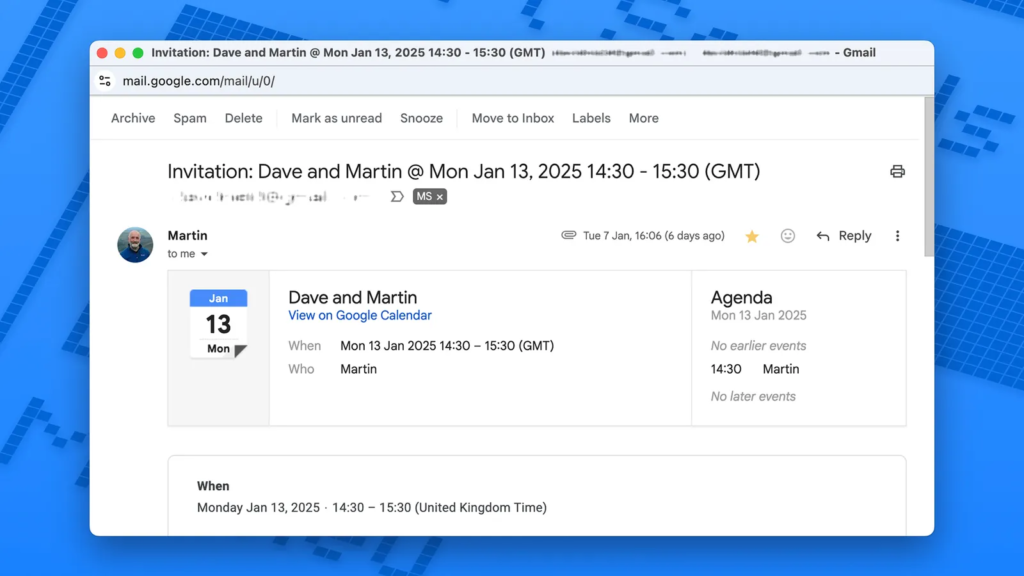
1. Phishing Scams Disguised as Calendar Invites

  • Cybercriminals send fake Google Calendar invitations containing malicious links.
  • These invites appear legitimate—they may use official-looking email addresses or pretend to be from trusted contacts.
  • Clicking on the embedded links redirects users to fake login pages or phishing sites designed to steal personal information.

2. Embedded Malware in Event Descriptions

  • Some hackers embed malicious code inside Google Calendar event descriptions.
  • Clicking on these links could install malware on your device, giving attackers access to sensitive information.

3. Fake Customer Support or Security Alerts

  • Scammers send fake Google Calendar invites posing as Google support or IT teams.
  • These events contain warnings like “Your account has been compromised” or “Update your security settings immediately.”
  • Victims are then lured into providing login credentials, which are stolen by hackers.

4. Remote Access Trojan (RAT) Attacks

  • In some cases, Google Calendar vulnerabilities have been exploited to install Remote Access Trojans (RATs).
  • These Trojans allow hackers to take control of your device remotely, accessing files, passwords, and even webcams.

Why Google Calendar Is a Target for Cybercriminals

Google Calendar is an integrated service that connects with Gmail, Google Drive, and other Google apps. This makes it a prime target for attackers looking to exploit its trust and accessibility.

Key Reasons Why Hackers Target Google Calendar:

Widespread Use – Millions rely on it daily, making it a high-value target.
Instant Sync Across Devices – Fake invites appear automatically on connected smartphones, tablets, and desktops.
Trusted Notifications – Users expect calendar notifications, making them less suspicious.

How to Stay Safe from Google Calendar Malware Attacks

1. Verify the Sender Before Accepting Any Invite

  • Always check the sender’s email address before clicking on a Google Calendar event.
  • Legitimate Google invites will come from calendar-notification@google.com.

2. Avoid Clicking on Suspicious Links

  • If an event description contains unusual links, DO NOT CLICK.
  • Instead, hover over the link to preview the actual URL.

3. Turn Off Automatic Event Additions

By default, Google Calendar automatically adds invitations to your schedule—even from unknown senders. To prevent this:

  1. Open Google Calendar on your computer.
  2. Click on the gear icon (⚙️) in the top right and select Settings.
  3. Scroll to Event settings and find “Automatically add invitations.”
  4. Change it to “No, only show invitations to which I have responded.”

4. Enable Two-Factor Authentication (2FA)

  • Activating 2FA for your Google account adds an extra layer of security against unauthorized logins.
  • Go to Google Account > Security > 2-Step Verification and follow the setup instructions.

5. Regularly Review Connected Apps & Permissions

  1. Visit Google Security Checkup.
  2. Under “Third-party apps with account access”, revoke access to any unknown or suspicious apps.

6. Report & Delete Suspicious Invites

  • If you receive a spam calendar event, delete it immediately.
  • Click on the event > More actions > Report as spam.

7. Keep Google Calendar & Browser Updated

  • Google frequently releases security updates to patch vulnerabilities.
  • Make sure your browser (Chrome, Firefox, Edge) and Google Calendar app are always up to date.

What Google Is Doing to Improve Security

Google is aware of calendar-based phishing and malware attacks and has taken steps to strengthen security:
Enhanced spam filtering for Google Calendar invites.
Regular updates to patch security flaws.
Warning messages for suspicious events.

Despite these improvements, users must stay vigilant and take personal security precautions.

Final Thoughts: Stay Alert, Stay Safe

While Google Calendar is a powerful productivity tool, it’s important to recognize its potential security risks. Hackers are becoming more sophisticated, and malicious calendar invites are on the rise.

By following the best practices outlined in this guide—verifying event sources, disabling automatic event additions, enabling 2FA, and keeping your software updated—you can protect yourself from Google Calendar malware attacks.

Pro Tip: If something feels off about a calendar event, delete it immediately and report it to Google. Better safe than sorry!

Also Read: Google Unveils Car-Ready Apps Program in Android Auto 13.8 Update

Google Gemini Extensions Rebranded as ‘Apps’ and Enhanced with 2.0 Flash Thinking

Google has officially rebranded Gemini Extensions as “Apps” while also integrating them with Gemini 2.0 Flash Thinking, an advanced AI reasoning model aimed at improving performance and response accuracy. Although the core functionality remains unchanged, this update reflects Google’s ongoing efforts to streamline its AI ecosystem.

Additionally, Google Sheets is receiving an update that introduces a more efficient table formatting menu, making data organization easier for users. This article explores these changes and their implications for Gemini users.

What’s Changing in Google Gemini?

Google has made two key updates to its Gemini AI platform, affecting extensions and performance capabilities.

1. Extensions Are Now Called “Apps”

  • The Extensions menu in Gemini has been renamed to Apps across Android, iOS, and web versions.
  • The change does not affect the core functionality, meaning users can still access Gmail, Docs, Sheets, WhatsApp, Spotify, and other integrated services.
  • Google updated its support pages and documentation to reflect this change.

2. Powered by Gemini 2.0 Flash Thinking

  • The new AI reasoning model, Gemini 2.0 Flash Thinking, enhances performance for Gemini Apps.
  • Users can expect faster response times, improved context understanding, and enhanced task execution capabilities.
  • The update is available for both free and Gemini Advanced users.

3. Google Sheets Gets a Table Formatting Upgrade

  • A new formatting submenu in Google Sheets allows users to quickly access options like gridlines, alternating colors, condensed views, and footers.
  • This feature reduces the number of steps required for formatting, improving efficiency for data organization.

Why Did Google Rename Gemini Extensions?

Google frequently rebrands and restructures its products to create a more cohesive user experience. The decision to rename Extensions to Apps aligns with this approach and serves multiple purposes:

  • Simplifies AI integration by making Gemini’s capabilities feel more like built-in apps rather than add-ons.
  • Encourages wider adoption by using a familiar term that resonates with users.
  • Eliminates confusion with browser-based extensions, ensuring users understand that these are AI-powered tools within Gemini.

This change follows previous rebranding efforts, such as renaming Bard to Gemini, reflecting Google’s broader strategy to streamline AI offerings.

How These Updates Benefit Users

Faster and Smarter AI Assistance

  • Gemini 2.0 Flash Thinking enhances response speed and reasoning accuracy, leading to more precise answers and context-aware suggestions.

Seamless App Integration

  • Gemini Apps allow users to retrieve emails, generate documents, summarize messages, and interact with third-party services more efficiently.

Improved Productivity in Google Workspace

  • The Google Sheets table formatting update simplifies workflow by reducing the steps required for data organization.

Google’s AI Strategy: What’s Next?

As Google continues refining Gemini AI, several potential developments could follow:

  • Expanded third-party integrations beyond WhatsApp and Spotify.
  • Deeper automation in Google Workspace Apps for enhanced task management.
  • Further AI-driven refinements to improve personalization and efficiency.

Given Google’s history of rebrands and iterative updates, additional enhancements are expected in the coming months.

Final Thoughts

The renaming of Gemini Extensions to Apps might seem like a minor change, but it reflects Google’s larger goal of seamlessly integrating AI into everyday workflows. With the addition of Gemini 2.0 Flash Thinking, users can expect better performance, faster responses, and more intuitive AI interactions.

For those using Google Sheets, the new table formatting update further enhances productivity, demonstrating Google’s commitment to improving its ecosystem for both casual users and professionals.

With these updates, Google is positioning Gemini AI as an essential productivity tool, making it a more powerful competitor in the AI-driven assistant space.

Also Read: Google’s Find My Device App Gets a Major Redesign: New ‘People’ Tab, Live Location, and More


Frequently Asked Questions (FAQs)

What happened to Gemini Extensions?

Google has renamed Gemini Extensions to “Apps”, but their functionality remains unchanged.

What is Gemini 2.0 Flash Thinking?

It is an enhanced AI reasoning model that improves response speed, accuracy, and task execution for Gemini Apps.

Will this change how I use Gmail, Docs, or WhatsApp in Gemini?

No, the name change does not affect functionality. Users can still access all integrated services as before.

What improvements are coming to Google Sheets?

Google Sheets now includes a table formatting submenu, allowing users to quickly adjust gridlines, colors, and layouts.

Is Gemini 2.0 Flash Thinking available for free users?

Yes, both free and Gemini Advanced users benefit from the new AI-powered performance enhancements.

Google’s Find My Device App Gets a Major Redesign: New ‘People’ Tab, Live Location, and More

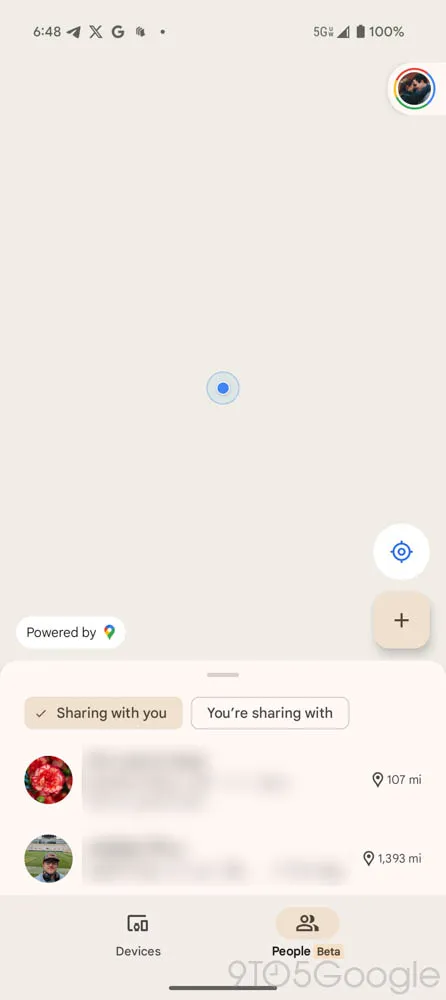
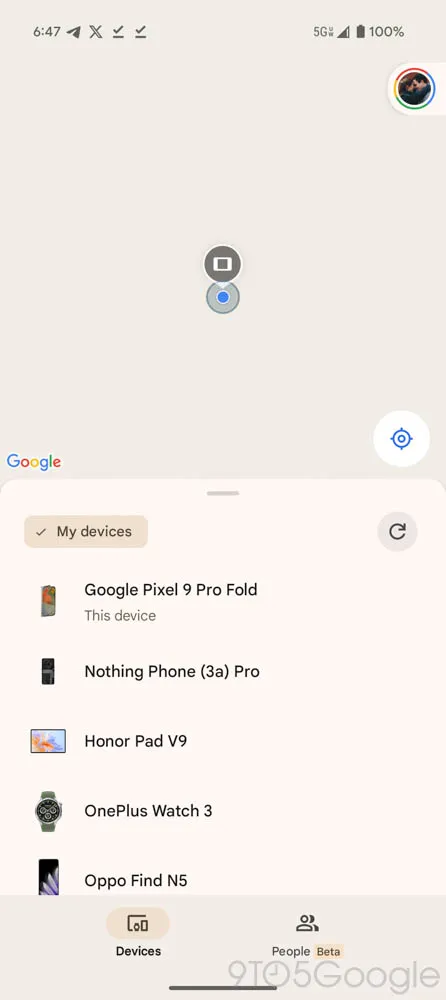
Google has rolled out a major redesign for its Find My Device app, introducing a two-tab interface, improved location previews, and live location sharing. This update significantly enhances the user experience, making it easier to track your devices and even share locations with friends and family.

With Find My Device v3.1.277, Google has integrated a new ‘People’ tab, allowing seamless location sharing via Google Maps. Additionally, users can now see their own live location when tracking a device, improving navigation and tracking efficiency.

Let’s take a closer look at the latest features, improvements, and why this update is a game-changer for Android users.

What’s New in Find My Device?

The latest Find My Device update brings several enhancements designed to make device tracking and location sharing more intuitive.

1. New Two-Tab UI for Better Navigation

Google has redesigned the interface to feature two primary tabs:

Devices Tab – Displays all your linked devices and trackers, along with an improved location preview.
People Tab – A brand-new addition that allows users to see and share locations with others via Google Maps.

This new two-tab layout simplifies navigation and makes it easier to switch between tracking devices and sharing locations.

2. Introducing the ‘People’ Tab for Location Sharing

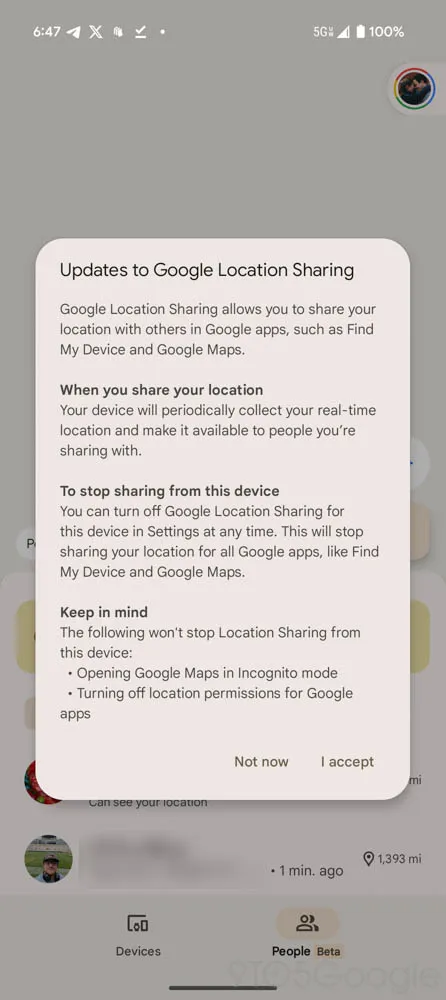
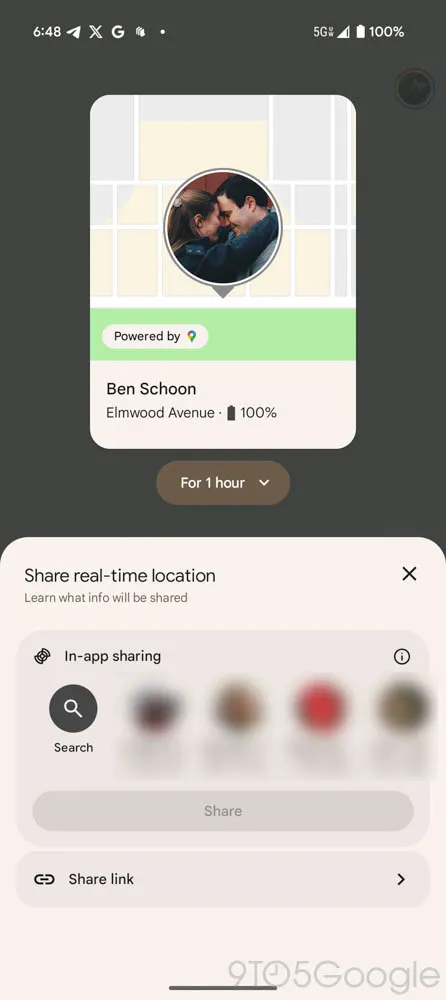
One of the biggest additions in this update is the ‘People’ tab, which enables location sharing similar to Google Maps.

Share your live location via a direct link or through your Google account.
View the real-time locations of friends or family members who have shared their locations with you.
Fix location-sharing issues on new devices, ensuring your position is always accurately displayed.

Although this feature has existed in Google Maps, its integration into Find My Device makes tracking easier by combining it with device tracking.

3. Improved Location Previews for Devices

The Devices Tab has been upgraded to display:

A larger and more detailed location preview at the top of the screen.
A simplified list of devices and trackers at the bottom for quick access.

This layout ensures that location tracking starts immediately when the app opens, allowing users to find lost devices faster.

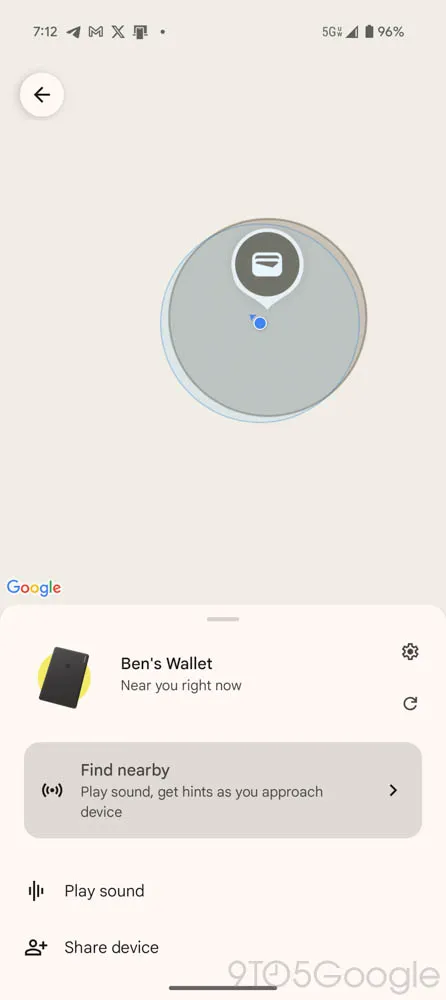
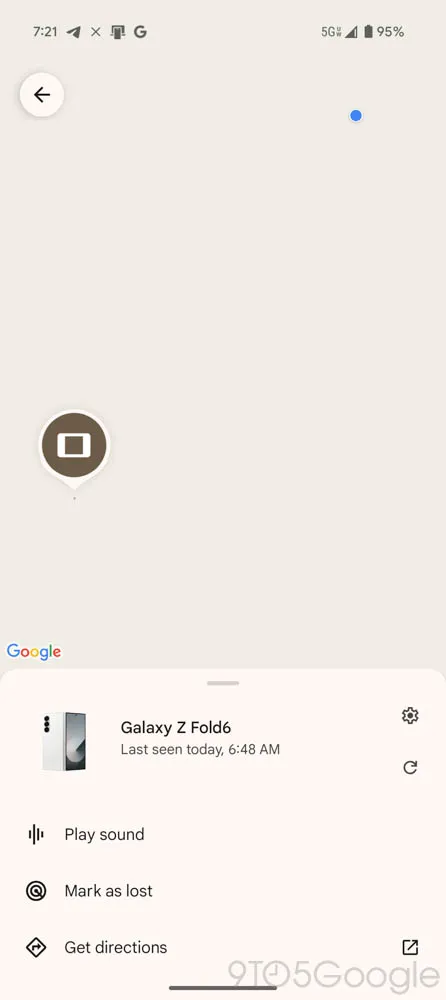
4. See Your Own Live Location While Tracking Devices

Previously, when searching for a device, Find My Device only showed the target device’s location. With this update, you can now:

See your own live location on the same map.
Compare your location to the lost device’s location for better navigation.
Avoid confusion when tracking close-range devices like smart tags and Bluetooth trackers.

This small yet powerful upgrade makes it much easier to locate misplaced devices in real time.

How These Features Improve the User Experience

✅ Easier Navigation with the Two-Tab System

The new layout removes clutter and simplifies tracking by dividing devices and people into separate tabs. Users no longer have to search through multiple menus to find what they need.

✅ Enhanced Location Sharing for Families and Friends

With the ‘People’ tab, users can now share their real-time location effortlessly, making it easier to coordinate meet-ups, track family members, or monitor children’s locations.

✅ Faster and More Accurate Device Tracking

The improved location preview and live location tracking help users quickly locate lost devices, reducing frustration and saving time.

Find My Device vs. Apple’s ‘Find My’ App: How Do They Compare?

Google’s latest updates to Find My Device make it more competitive with Apple’s Find My app. Here’s a comparison:

FeatureGoogle Find My DeviceApple Find My
Live Location Sharing✅ Yes (New ‘People’ Tab)✅ Yes
Device Location Preview✅ Yes (Bigger Map View)✅ Yes
Track Your Own Location✅ Yes (New Feature)❌ No
Customizable Notifications✅ Yes✅ Yes
Integration with Bluetooth Trackers✅ Yes (Google’s FMD Network)✅ Yes (Apple AirTags)

While Apple’s Find My is more established, Google’s latest redesign adds key features that bring it closer to its competitor—and even surpasses it in some areas, such as showing your own live location.

Potential Limitations and Future Updates

While this Find My Device update is a significant improvement, some limitations remain:

❌ What’s Missing?

  • No ability to reorder devices – The app still opens to the first device in the list, rather than letting users customize the order.
  • Limited rollout – The update isn’t widely available yet and is rolling out in phases.
  • No cross-platform support – Unlike Apple’s Find My, which works across all Apple devices, Google’s service is limited to Android.

🔧 What Could Improve in Future Updates?

Reordering devices – Allow users to prioritize frequently tracked devices.
Expanded tracker support – Support for third-party Bluetooth trackers.
More advanced notifications – Custom alerts for when a device leaves a set area.

Final Thoughts: A Major Step Forward for Android Users

Google’s Find My Device v3.1.277 is one of the biggest updates yet, bringing essential features like:

A new two-tab UI for easier navigation.
The ‘People’ tab for effortless location sharing.
Live location tracking while searching for devices.
A better, more functional device tracking system.

These changes streamline tracking, enhance location sharing, and make finding lost devices easier than ever. While some improvements are still needed, this update brings Find My Device closer to Apple’s Find My ecosystem and is a major win for Android users.

Also Read: How Small Businesses Can Beat Big Brands with SEO


Frequently Asked Questions (FAQs)

❓ What is the new ‘People’ tab in Find My Device?

The ‘People’ tab allows users to share their location in real time, similar to Google Maps location sharing.

❓ Can I track my live location while looking for another device?

Yes! Find My Device now shows your own live location, making it easier to compare it with your lost device’s location.

❓ Is this update available for all Android devices?

The update is rolling out gradually, so it may not be available for everyone yet.

❓ Can I change the order of my tracked devices?

No, Find My Device still doesn’t allow users to reorder their tracked devices, but this may change in future updates.

❓ How does this compare to Apple’s ‘Find My’ app?

Google’s Find My Device is now closer to Apple’s Find My, with features like location previews and real-time tracking. However, cross-platform support is still missing.

🚀 Get ready for a better tracking experience with Find My Device’s latest update! 📍

Google’s Gemini Advanced Gets Major AI Upgrades – What’s New?

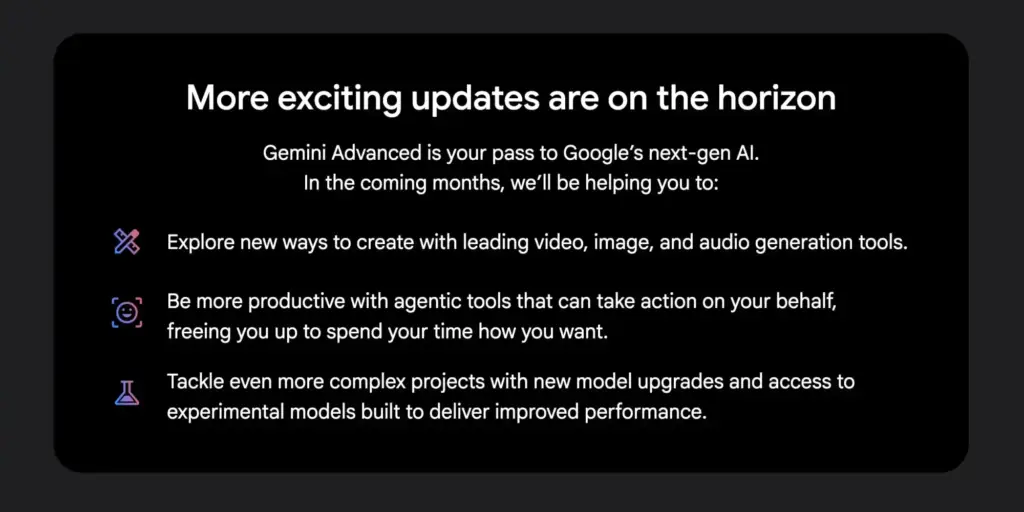
Google has recently teased significant updates for its Gemini Advanced subscription, revealing what’s coming in the next few months. These updates aim to improve AI capabilities, content generation, and productivity tools for users.

Let’s explore what’s new in Gemini Advanced and how these changes will impact users.

What Is Gemini Advanced?

Gemini Advanced is Google’s premium AI service, available for $19.99 per month under the Google AI Premium Plan. It provides access to cutting-edge AI models, enabling advanced reasoning, coding, and content generation.

Google’s latest newsletter to Gemini Advanced subscribers hints at a series of powerful updates that will enhance user experience across different domains.

Upcoming Features and Enhancements

1. New AI Models: Improved Accuracy & Transparency

Google is rolling out two experimental AI models to enhance reasoning, accuracy, and transparency:

  • Gemini 2.0 Pro Experimental: This model is optimized for handling complex tasks with improved factual accuracy, making it ideal for coding, mathematical problem-solving, and research-based queries.
  • Gemini 2.0 Flash Thinking: Unlike traditional models, Flash Thinking will display its reasoning process in real time, allowing users to trace AI-generated responses step by step.

These advancements are designed to improve reliability and make AI more transparent and accountable.

2. Expanded AI-Generated Content: Video, Image, and Audio

Google has confirmed that Gemini Advanced users will soon have access to enhanced video, image, and audio generation tools.

  • Imagen 3: Google’s advanced image-generation model, capable of creating hyper-realistic visuals, will see further refinements.
  • Veo 2: A high-quality AI video generation tool, currently in testing under Google Labs, may become widely available for Gemini Advanced subscribers.
  • MusicLM and Lyria: These AI tools specialize in music and audio generation, potentially allowing users to create original music compositions and soundtracks.

With these expanded creative tools, users will have more flexibility in multimedia content creation, making Gemini a serious competitor to platforms like OpenAI’s DALL·E and Midjourney.

3. AI Agent Tools: Automating Tasks Like Never Before

One of the most exciting updates involves agentic AI tools that will take action on behalf of users to automate workflows.

  • Project Mariner: Expected to integrate with Google Workspace, this AI-powered assistant will help users organize email attachments, generate Google Sheets, and analyze data with AI-powered insights.
  • Automated AI Assistants: Gemini Advanced will be able to autonomously complete routine tasks, freeing up users’ time and increasing productivity.

These AI agents could revolutionize office work, helping professionals manage tasks seamlessly across Google’s ecosystem.

4. Advanced AI Models for Complex Projects

Google has also hinted at continuous improvements to Gemini’s core models, providing:

  • Faster processing speeds
  • Greater contextual understanding
  • More efficient multitasking capabilities

As part of this evolution, Gemini 2.0 Pro will eventually become the default model for Advanced subscribers, bringing more power and accuracy to everyday AI interactions.

What This Means for Gemini Users

With these updates, Google is positioning Gemini as a top-tier AI platform, competing directly with OpenAI’s ChatGPT-4, Anthropic’s Claude, and Meta’s AI models.

For content creators, business professionals, and developers, Gemini Advanced will offer:
✅ More powerful AI reasoning and fact-checking
✅ Expanded creative tools for video, image, and music generation
✅ Smarter automation for office productivity
✅ Faster and more transparent AI responses

These features make Gemini Advanced a must-have for users who want cutting-edge AI capabilities.

Conclusion: Is Gemini Advanced Worth It?

With the latest updates, Google is pushing AI boundaries by expanding Gemini’s capabilities in creativity, productivity, and automation. The upcoming features could make Gemini Advanced one of the most comprehensive AI subscriptions available.

For those already subscribed, this is an exciting glimpse into the future of Google’s AI ecosystem. For those considering it, these powerful upgrades might make Gemini Advanced worth the investment.

💡 Would you subscribe to Gemini Advanced for these new features? Let us know in the comments! 🚀

Also Read: Google Search Testing Background Section


FAQs

1. What is Gemini Advanced?

Gemini Advanced is Google’s premium AI subscription that offers access to its most powerful AI models, including Gemini 2.0 Pro and Flash Thinking. It costs $19.99/month under the Google AI Premium Plan.

2. What’s new in Gemini Advanced?

Some major updates include:
Longer, more detailed AI responses
New AI-generated video, image, and music tools
AI-powered workflow automation
Enhanced transparency with Flash Thinking AI

3. How does Gemini Advanced compare to ChatGPT-4?

Gemini Advanced focuses on real-time AI reasoning, agentic automation, and expanded multimedia generation, making it a strong competitor to OpenAI’s ChatGPT-4.

4. When will these new features roll out?

Google has teased that the updates will roll out over the next few months, though some features, like Veo 2 and MusicLM, are still in limited beta testing.

5. Where can I subscribe to Gemini Advanced?

You can subscribe via the Google One Premium AI Plan for $19.99/month through the Google Gemini app.

Google Search Testing Background Section

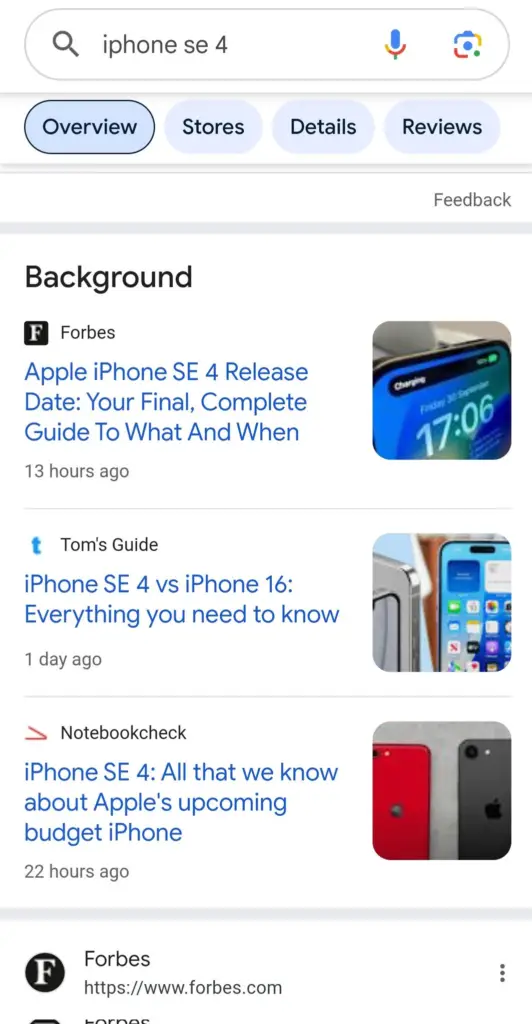
Google is continuously evolving its search experience to provide users with more relevant and comprehensive information. One of its latest experiments involves the introduction of a “Background” section in search results. This new feature aims to offer additional context on trending topics by aggregating key articles from authoritative sources.

What is the “Background” Section?

The “Background” section is a newly tested feature that appears within Google Search results. It curates relevant articles that provide in-depth insights, historical context, and analysis on a particular search topic. The feature is particularly useful for trending searches where users seek a well-rounded understanding of the subject.

Key Characteristics of the Background Section:

  • Found within Google Search results under specific queries.
  • Displays articles from reputable publishers such as Forbes, CNN, and Tom’s Guide.
  • Aims to provide historical context and additional information beyond basic search snippets.
  • Currently in the testing phase and not widely rolled out.

How It Works

When users search for a topic that Google deems relevant for additional context, a “Background” section may appear within the search results. This section contains links to in-depth articles that explain the subject from multiple angles. For example, searching for “iPhone SE 4” might show background articles discussing its release timeline, features, and comparison to previous models.

Google appears to be using this feature to surface valuable content that goes beyond real-time updates. Instead of just showing the latest news, the “Background” section presents well-researched articles that help users develop a deeper understanding of a subject.

Potential Impact on Search Experience

The introduction of the Background section can significantly influence how users interact with search results:

Benefits for Users

  • More Context: Users receive in-depth information rather than just real-time updates.
  • Trusted Sources: Google appears to prioritize reputable sources, reducing misinformation.
  • Better Understanding: Instead of clicking through multiple links, users can access summarized insights in one place.

Impact on SEO & Digital Publishers

  • Traffic Distribution: Publishers featured in the Background section may see increased organic traffic.
  • Content Quality Emphasis: Sites producing in-depth, research-backed content may benefit from improved visibility.
  • Competitive Advantage: Websites included in this feature gain credibility and authority.

Similar Features in Google Search

Google has been experimenting with similar enhancements in recent months:

  1. “For Context” Feature – Found in Google News, providing background information on breaking news.
  2. “Perspectives” Section – Highlighting diverse viewpoints from blogs, forums, and social media.
  3. AI-Generated Summaries – Experimenting with AI-driven search results to provide quick overviews.

These features demonstrate Google’s push toward enhancing user experience by offering comprehensive, reliable, and structured information.

Future Implications

While still in the experimental phase, the Background section could reshape how information is consumed in Google Search. If successfully rolled out, it may:

  • Become a standard feature for major news topics and tech releases.
  • Influence SEO strategies, as in-depth content gains more priority.
  • Shift how users engage with search results, encouraging longer dwell times and better-informed decision-making.

Conclusion

Google’s Background section is an innovative step toward making search results more informative and user-friendly. By providing additional context through reputable sources, Google enhances the search experience and empowers users with well-rounded knowledge. While its full rollout remains uncertain, this feature signifies Google’s ongoing efforts to prioritize quality content and improve search relevance.

Stay Updated

As Google continues refining this feature, publishers and SEO professionals should focus on creating high-value, research-driven content to stay competitive in the evolving search landscape. 🚀

Also Read: Google Stays on Top in AI as China’s DeepSeek Gains Attention

Google Stays on Top in AI as China’s DeepSeek Gains Attention

Artificial intelligence (AI) is heating up, and Google isn’t backing down. Even though China’s DeepSeek AI is making waves, Google’s leaders are confident they still lead the AI game. Let’s break it down in a simple way.

Google vs. DeepSeek: The AI Battle

DeepSeek AI, a Chinese AI company, has been making headlines, and some experts are wondering if it could challenge Google’s AI dominance. But Google DeepMind’s CEO, Demis Hassabis, isn’t too worried. He believes DeepSeek’s reported training costs are likely lower than the real expenses and that it may have used more Western AI technology than it admits.

Google’s AI: Still the Best?

Hassabis made it clear that Google’s AI models are still more efficient and more powerful than DeepSeek’s. He did acknowledge that DeepSeek is China’s most advanced AI team, but that doesn’t mean it’s ready to beat Google just yet. However, its growth does raise important concerns in security and global politics.

DeepSeek’s Impact on the Market

When DeepSeek launched its AI model, R1, in January, it shook up the market. Tech stocks took a hit, and even Nvidia—one of the biggest players in AI—lost around $589 billion in market value on January 27.

Big Tech Is Still Spending Big on AI

Despite DeepSeek’s cost-cutting approach, big U.S. tech companies like Google, Amazon, Meta, and Microsoft aren’t holding back. They have invested billions into AI research and plan to continue in 2025. Their strategy is clear: spend big and stay ahead.

Google’s AI Ethics Debate

While Google continues to push AI forward, there are growing internal concerns about its changing ethics policies. Employees are questioning whether AI should be used for things like surveillance and military purposes.

Kent Walker, Google’s head of global affairs, explained the shift. He said Google’s strict AI rules, set in 2018 after its involvement in Project Maven (a military AI project), might not fit today’s AI landscape. Instead, Google believes AI needs flexible policies that adapt to its rapid growth.

What’s Next?

AI is evolving fast, and Google is making sure it stays ahead. While DeepSeek is gaining attention, Google’s confidence in its superior AI models and massive investments show that it’s not giving up its AI crown anytime soon.

The AI battle is just getting started—who do you think will win?

Also Read: Elevate Your Digital Marketing Strategy: The Comprehensive Audit Checklist for 2025

Google Unveils Car-Ready Apps Program in Android Auto 13.8 Update

Google has introduced a new “Car-Ready Apps Program” as part of its latest Android Auto 13.8 update. This initiative aims to enhance the in-car digital experience by enabling more third-party developers to create applications optimized for use in vehicles. With the growing demand for smarter in-car infotainment systems, Google’s latest update is a significant step toward a more seamless and user-friendly driving experience.

What Is the Car-Ready Apps Program?

The Car-Ready Apps Program is designed to expand the variety of apps available for Android Auto users. Previously, only select applications, primarily those related to navigation, communication, and media, were allowed. With this update, Google is inviting developers to create apps across a broader spectrum, including productivity, smart home integration, and more.

Key Features of the Program:

  • Expanded App Categories: Google is now allowing more diverse app categories beyond navigation and entertainment.
  • Developer Access: The program provides third-party developers with tools and guidelines to ensure their apps meet Google’s safety and usability standards for in-car use.
  • Enhanced User Experience: Apps designed under this program will be optimized for the Android Auto interface, reducing distractions while driving.

Android Auto 13.8 Update: What’s New?

Apart from the Car-Ready Apps Program, the Android Auto 13.8 update brings several improvements and bug fixes aimed at refining the overall user experience.

Notable Updates:

  1. Improved Performance & Stability: The update enhances connectivity and stability, reducing instances of crashes or lag.
  2. Enhanced Google Assistant Integration: Voice commands have become more intuitive, allowing users to control apps more efficiently.
  3. Better App Compatibility: Developers can now design apps with improved touch and voice control interfaces for safer navigation.
  4. Security Enhancements: Google has strengthened security protocols to protect user data while using Android Auto.

How This Update Benefits Users

The Android Auto 13.8 update is set to make in-car entertainment and navigation more convenient and interactive. Here’s how:

  • More Choices for Users: With a broader range of apps, users can access productivity tools, smart home controls, and other useful applications while on the road.
  • Seamless Integration: Developers will ensure their apps are fully compatible with the Android Auto UI, providing a hassle-free experience.
  • Increased Safety: Google’s strict guidelines for app development ensure minimal driver distraction, making the driving experience safer.

Impact on Developers

For developers, this program opens up new opportunities to create innovative in-car experiences. Google is offering comprehensive resources, including:

  • API Access: Developers can access the Android Auto API to tailor their apps for automotive use.
  • Testing & Certification: Apps must undergo rigorous testing to ensure they comply with Google’s usability and safety standards.
  • Market Expansion: By adapting their apps for Android Auto, developers can reach a growing audience of car owners who rely on in-car technology.

Future Prospects for Android Auto

With the launch of the Car-Ready Apps Program, Android Auto is poised to become more versatile and competitive in the connected car ecosystem. Google’s commitment to enhancing the platform means users can expect more features and improvements in the near future.

Expected Enhancements:

  • Deeper Integration with Google Services: More apps leveraging Google’s AI and cloud technology.
  • Expansion to More Vehicles: More automakers may integrate Android Auto natively into their infotainment systems.
  • Enhanced Customization Options: Users may gain more control over the interface and settings to personalize their experience.

Conclusion

Google’s Android Auto 13.8 update, with its Car-Ready Apps Program, is a major leap forward in automotive technology. By empowering developers and expanding the range of available apps, Google is ensuring a more connected and productive driving experience. Whether you are a user looking for new app options or a developer eager to innovate in the automotive space, this update brings exciting possibilities for the future of in-car digital solutions.

Google Updates Crypto Ad Policy in UAE – What It Means for You

Google just made a big change to how cryptocurrency ads work in the UAE! If you’re into crypto or run a crypto business, this update is important.

Starting February 26, 2025, Google will allow crypto exchanges and software wallets to advertise in the UAE only if they meet specific rules and get Google’s approval.

What Are the New Rules?

To advertise crypto-related services in the UAE, businesses must:

Why Did Google Change Its Policy?

Google wants to protect users from scams and make sure only legit crypto companies can advertise. Since crypto is risky, this step ensures businesses are properly regulated.

What Happens If Companies Don’t Follow the Rules?

If a crypto company violates Google’s policy, their ad account will be suspended. But they’ll get a 7-day warning before any suspension.

How Does This Impact Crypto in UAE?

This update means that top crypto exchanges like Binance, OKX, and Crypto.com can now target UAE customers with ads. Even local exchanges like BitOasis, M2, and CoinMENA can advertise.

Even crypto custodians (companies that store crypto safely) like Komainu and Liminal will now be able to promote their services on Google.

Why the UAE Loves Crypto

The UAE is becoming a crypto hub in the Middle East. More than 30% of the population owns crypto! And with big investments like $436 million from UAE’s sovereign wealth fund into BlackRock’s Bitcoin ETF, the country is going all in on digital assets.

Conclusion

Google’s update is a win for the crypto industry in the UAE. It allows legit businesses to advertise while keeping scams out. If you’re in crypto, make sure you’re licensed and Google-certified before running ads!

Also Read: Google’s New Search Policies Shake Up Digital Publishing in 2025