How to Stop Instagram and Facebook from Tracking Your Internet Activity

Meta, the parent company of Instagram and Facebook, has long faced criticism for tracking user activity across websites and apps. This data collection is used for targeted advertising, often leading users to see ads related to their recent online searches.

To address these privacy concerns, Meta has introduced a feature called “Activity Off-Meta Technologies”, allowing users to manage and restrict how much of their online activity is shared with these platforms. This guide will walk you through how to stop Instagram and Facebook from tracking your internet activity and regain control of your data.

What is Activity Off-Meta Technologies?

Activity Off-Meta Technologies is a privacy feature that lets users:
View and manage data that businesses share with Meta.
Disconnect specific websites and apps from tracking their activity.
Clear previously collected data.
Prevent future tracking of online behavior.

This tool is crucial for users who want to reduce personalized ads and increase privacy across Facebook and Instagram.

How to Stop Instagram from Tracking Your Activity

Step 1: Open Instagram Settings

  1. Open the Instagram app and tap your profile picture in the bottom-right corner.
  2. Tap the three horizontal lines (menu) in the top-right corner.
  3. Select “Settings and Privacy” from the menu.

Step 2: Manage Activity Off-Meta Technologies

  1. Scroll down to “Activity” and tap “Activity Off-Meta Technologies”.
  2. Toggle “Disconnect Future Activity” to prevent Instagram from tracking your activity on other apps and websites.

Step 3: Delete Past Activity

  1. From the “Activity Off-Meta Technologies” page, tap “Your Information and Permissions”.
  2. Select “Your Activity off Meta Technologies” to manage past data.
  3. You can:
    • See recent activity Meta has tracked.
    • Disconnect specific apps and websites from sharing data.
    • Clear previously collected information.
    • Manage future tracking preferences.

If you enable “Disconnect Future Activity”, it will automatically delete past data as well.

How to Stop Facebook from Tracking Your Activity

Step 1: Access Facebook Settings

  1. Open the Facebook app and tap the menu icon (three lines) in the top-right corner.
  2. Scroll down and select “Settings & Privacy”, then tap “Settings”.

Step 2: Manage Off-Facebook Activity

  1. Scroll to “Your Facebook Information” and tap “Off-Facebook Activity”.
  2. Here, you can view a list of businesses that have shared your activity with Facebook.

Step 3: Disconnect and Clear Data

  1. Tap “Manage Your Off-Facebook Activity”.
  2. Select “Clear History” to remove previously collected data.
  3. Toggle “Disconnect Future Activity” to stop Facebook from tracking your interactions with third-party sites and apps.

Why Should You Disable Tracking?

1. Increased Privacy Protection

  • Meta collects vast amounts of user data to personalize ads. Disabling tracking helps limit this intrusive data collection.

2. Fewer Targeted Ads

  • Without tracking, you will see fewer ads based on your browsing history, making your experience less influenced by online activity.

3. Greater Control Over Your Data

  • Users can review, manage, and delete their activity, preventing businesses from using personal information without consent.

Limitations of Disabling Tracking

  • You may still see ads, but they will be less personalized.
  • Some websites and apps may require tracking for login or features.
  • Meta still collects limited data based on in-app activity (such as posts you like or accounts you follow).

Despite these limitations, managing Activity Off-Meta Technologies significantly reduces unnecessary data sharing.

Final Thoughts

Meta’s tracking practices have raised privacy concerns for years, but with the Activity Off-Meta Technologies feature, users now have the option to regain control over their online data. By following these simple steps on Instagram and Facebook, you can limit how much of your internet activity is shared with advertisers and businesses.

Taking these steps ensures that your personal data remains private, making your social media experience more secure and less intrusive.

Also Read:


Frequently Asked Questions (FAQs)

1. Does disabling tracking stop all ads on Instagram and Facebook?

No, you will still see ads, but they will be less personalized and not based on your external browsing history.

2. Can Meta still collect my data after I disable tracking?

Yes, Meta can still track in-app interactions, such as likes, follows, and searches, but it will no longer track your activity outside of Instagram and Facebook.

3. Will this setting remove all past data Meta has collected?

Yes, if you select “Disconnect Future Activity”, it will also clear past activity data.

4. Can I turn tracking back on later?

Yes, you can go back to Activity Off-Meta Technologies settings and re-enable tracking at any time.

Google Gemini Extensions Rebranded as ‘Apps’ and Enhanced with 2.0 Flash Thinking

Google has officially rebranded Gemini Extensions as “Apps” while also integrating them with Gemini 2.0 Flash Thinking, an advanced AI reasoning model aimed at improving performance and response accuracy. Although the core functionality remains unchanged, this update reflects Google’s ongoing efforts to streamline its AI ecosystem.

Additionally, Google Sheets is receiving an update that introduces a more efficient table formatting menu, making data organization easier for users. This article explores these changes and their implications for Gemini users.

What’s Changing in Google Gemini?

Google has made two key updates to its Gemini AI platform, affecting extensions and performance capabilities.

1. Extensions Are Now Called “Apps”

  • The Extensions menu in Gemini has been renamed to Apps across Android, iOS, and web versions.
  • The change does not affect the core functionality, meaning users can still access Gmail, Docs, Sheets, WhatsApp, Spotify, and other integrated services.
  • Google updated its support pages and documentation to reflect this change.

2. Powered by Gemini 2.0 Flash Thinking

  • The new AI reasoning model, Gemini 2.0 Flash Thinking, enhances performance for Gemini Apps.
  • Users can expect faster response times, improved context understanding, and enhanced task execution capabilities.
  • The update is available for both free and Gemini Advanced users.

3. Google Sheets Gets a Table Formatting Upgrade

  • A new formatting submenu in Google Sheets allows users to quickly access options like gridlines, alternating colors, condensed views, and footers.
  • This feature reduces the number of steps required for formatting, improving efficiency for data organization.

Why Did Google Rename Gemini Extensions?

Google frequently rebrands and restructures its products to create a more cohesive user experience. The decision to rename Extensions to Apps aligns with this approach and serves multiple purposes:

  • Simplifies AI integration by making Gemini’s capabilities feel more like built-in apps rather than add-ons.
  • Encourages wider adoption by using a familiar term that resonates with users.
  • Eliminates confusion with browser-based extensions, ensuring users understand that these are AI-powered tools within Gemini.

This change follows previous rebranding efforts, such as renaming Bard to Gemini, reflecting Google’s broader strategy to streamline AI offerings.

How These Updates Benefit Users

Faster and Smarter AI Assistance

  • Gemini 2.0 Flash Thinking enhances response speed and reasoning accuracy, leading to more precise answers and context-aware suggestions.

Seamless App Integration

  • Gemini Apps allow users to retrieve emails, generate documents, summarize messages, and interact with third-party services more efficiently.

Improved Productivity in Google Workspace

  • The Google Sheets table formatting update simplifies workflow by reducing the steps required for data organization.

Google’s AI Strategy: What’s Next?

As Google continues refining Gemini AI, several potential developments could follow:

  • Expanded third-party integrations beyond WhatsApp and Spotify.
  • Deeper automation in Google Workspace Apps for enhanced task management.
  • Further AI-driven refinements to improve personalization and efficiency.

Given Google’s history of rebrands and iterative updates, additional enhancements are expected in the coming months.

Final Thoughts

The renaming of Gemini Extensions to Apps might seem like a minor change, but it reflects Google’s larger goal of seamlessly integrating AI into everyday workflows. With the addition of Gemini 2.0 Flash Thinking, users can expect better performance, faster responses, and more intuitive AI interactions.

For those using Google Sheets, the new table formatting update further enhances productivity, demonstrating Google’s commitment to improving its ecosystem for both casual users and professionals.

With these updates, Google is positioning Gemini AI as an essential productivity tool, making it a more powerful competitor in the AI-driven assistant space.

Also Read: Google’s Find My Device App Gets a Major Redesign: New ‘People’ Tab, Live Location, and More


Frequently Asked Questions (FAQs)

What happened to Gemini Extensions?

Google has renamed Gemini Extensions to “Apps”, but their functionality remains unchanged.

What is Gemini 2.0 Flash Thinking?

It is an enhanced AI reasoning model that improves response speed, accuracy, and task execution for Gemini Apps.

Will this change how I use Gmail, Docs, or WhatsApp in Gemini?

No, the name change does not affect functionality. Users can still access all integrated services as before.

What improvements are coming to Google Sheets?

Google Sheets now includes a table formatting submenu, allowing users to quickly adjust gridlines, colors, and layouts.

Is Gemini 2.0 Flash Thinking available for free users?

Yes, both free and Gemini Advanced users benefit from the new AI-powered performance enhancements.

Google’s Find My Device App Gets a Major Redesign: New ‘People’ Tab, Live Location, and More

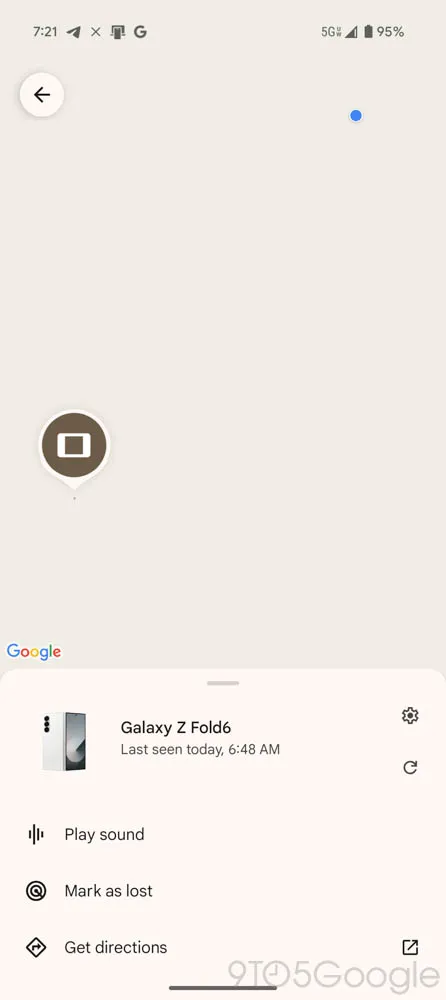
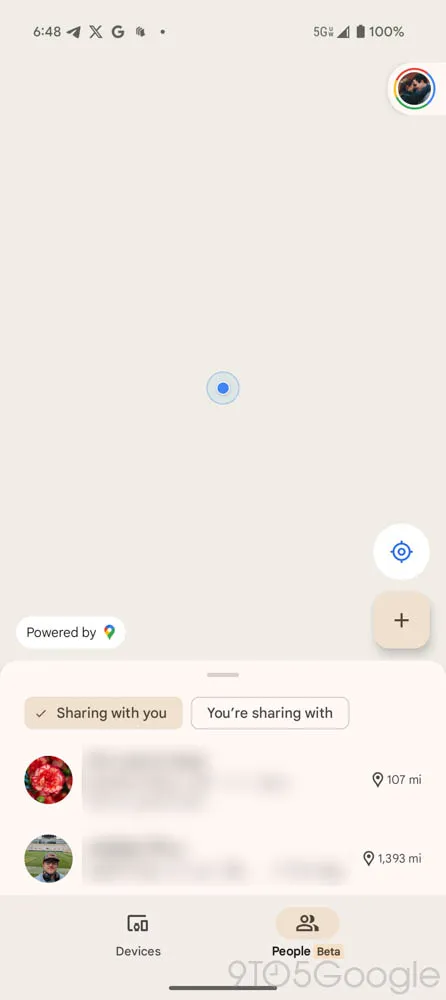
Google has rolled out a major redesign for its Find My Device app, introducing a two-tab interface, improved location previews, and live location sharing. This update significantly enhances the user experience, making it easier to track your devices and even share locations with friends and family.

With Find My Device v3.1.277, Google has integrated a new ‘People’ tab, allowing seamless location sharing via Google Maps. Additionally, users can now see their own live location when tracking a device, improving navigation and tracking efficiency.

Let’s take a closer look at the latest features, improvements, and why this update is a game-changer for Android users.

What’s New in Find My Device?

The latest Find My Device update brings several enhancements designed to make device tracking and location sharing more intuitive.

1. New Two-Tab UI for Better Navigation

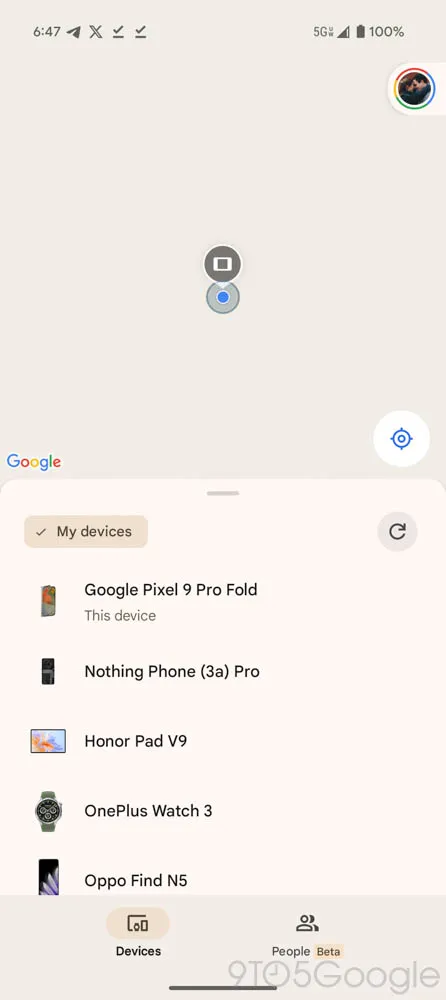
Google has redesigned the interface to feature two primary tabs:

Devices Tab – Displays all your linked devices and trackers, along with an improved location preview.
People Tab – A brand-new addition that allows users to see and share locations with others via Google Maps.

This new two-tab layout simplifies navigation and makes it easier to switch between tracking devices and sharing locations.

2. Introducing the ‘People’ Tab for Location Sharing

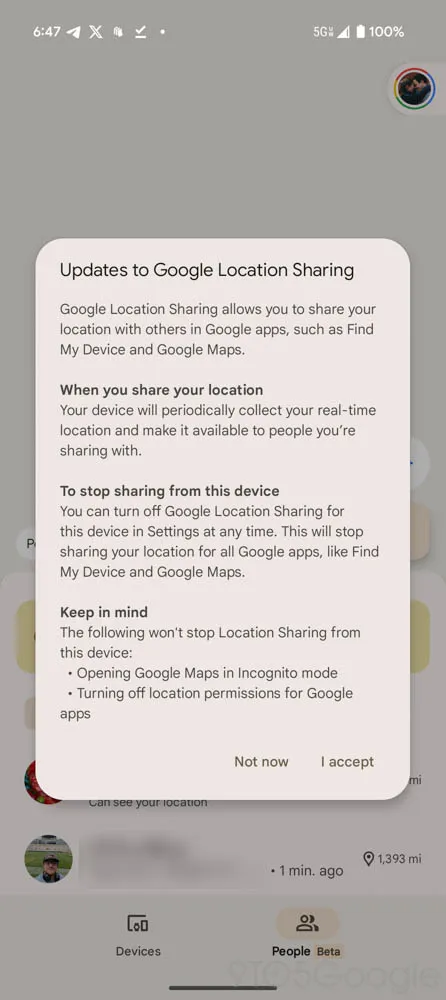
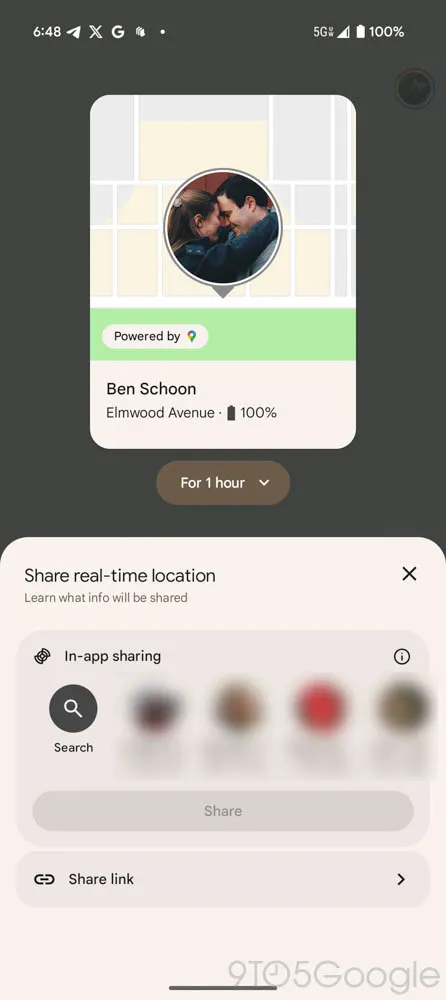
One of the biggest additions in this update is the ‘People’ tab, which enables location sharing similar to Google Maps.

Share your live location via a direct link or through your Google account.
View the real-time locations of friends or family members who have shared their locations with you.
Fix location-sharing issues on new devices, ensuring your position is always accurately displayed.

Although this feature has existed in Google Maps, its integration into Find My Device makes tracking easier by combining it with device tracking.

3. Improved Location Previews for Devices

The Devices Tab has been upgraded to display:

A larger and more detailed location preview at the top of the screen.
A simplified list of devices and trackers at the bottom for quick access.

This layout ensures that location tracking starts immediately when the app opens, allowing users to find lost devices faster.

4. See Your Own Live Location While Tracking Devices

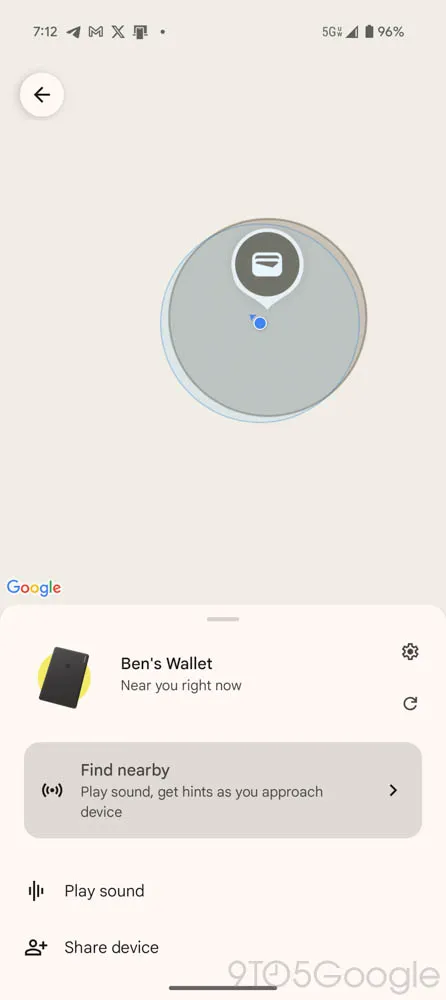
Previously, when searching for a device, Find My Device only showed the target device’s location. With this update, you can now:

See your own live location on the same map.
Compare your location to the lost device’s location for better navigation.
Avoid confusion when tracking close-range devices like smart tags and Bluetooth trackers.

This small yet powerful upgrade makes it much easier to locate misplaced devices in real time.

How These Features Improve the User Experience

✅ Easier Navigation with the Two-Tab System

The new layout removes clutter and simplifies tracking by dividing devices and people into separate tabs. Users no longer have to search through multiple menus to find what they need.

✅ Enhanced Location Sharing for Families and Friends

With the ‘People’ tab, users can now share their real-time location effortlessly, making it easier to coordinate meet-ups, track family members, or monitor children’s locations.

✅ Faster and More Accurate Device Tracking

The improved location preview and live location tracking help users quickly locate lost devices, reducing frustration and saving time.

Find My Device vs. Apple’s ‘Find My’ App: How Do They Compare?

Google’s latest updates to Find My Device make it more competitive with Apple’s Find My app. Here’s a comparison:

FeatureGoogle Find My DeviceApple Find My
Live Location Sharing✅ Yes (New ‘People’ Tab)✅ Yes
Device Location Preview✅ Yes (Bigger Map View)✅ Yes
Track Your Own Location✅ Yes (New Feature)❌ No
Customizable Notifications✅ Yes✅ Yes
Integration with Bluetooth Trackers✅ Yes (Google’s FMD Network)✅ Yes (Apple AirTags)

While Apple’s Find My is more established, Google’s latest redesign adds key features that bring it closer to its competitor—and even surpasses it in some areas, such as showing your own live location.

Potential Limitations and Future Updates

While this Find My Device update is a significant improvement, some limitations remain:

❌ What’s Missing?

  • No ability to reorder devices – The app still opens to the first device in the list, rather than letting users customize the order.
  • Limited rollout – The update isn’t widely available yet and is rolling out in phases.
  • No cross-platform support – Unlike Apple’s Find My, which works across all Apple devices, Google’s service is limited to Android.

🔧 What Could Improve in Future Updates?

Reordering devices – Allow users to prioritize frequently tracked devices.
Expanded tracker support – Support for third-party Bluetooth trackers.
More advanced notifications – Custom alerts for when a device leaves a set area.

Final Thoughts: A Major Step Forward for Android Users

Google’s Find My Device v3.1.277 is one of the biggest updates yet, bringing essential features like:

A new two-tab UI for easier navigation.
The ‘People’ tab for effortless location sharing.
Live location tracking while searching for devices.
A better, more functional device tracking system.

These changes streamline tracking, enhance location sharing, and make finding lost devices easier than ever. While some improvements are still needed, this update brings Find My Device closer to Apple’s Find My ecosystem and is a major win for Android users.

Also Read: How Small Businesses Can Beat Big Brands with SEO


Frequently Asked Questions (FAQs)

❓ What is the new ‘People’ tab in Find My Device?

The ‘People’ tab allows users to share their location in real time, similar to Google Maps location sharing.

❓ Can I track my live location while looking for another device?

Yes! Find My Device now shows your own live location, making it easier to compare it with your lost device’s location.

❓ Is this update available for all Android devices?

The update is rolling out gradually, so it may not be available for everyone yet.

❓ Can I change the order of my tracked devices?

No, Find My Device still doesn’t allow users to reorder their tracked devices, but this may change in future updates.

❓ How does this compare to Apple’s ‘Find My’ app?

Google’s Find My Device is now closer to Apple’s Find My, with features like location previews and real-time tracking. However, cross-platform support is still missing.

🚀 Get ready for a better tracking experience with Find My Device’s latest update! 📍

How Small Businesses Can Beat Big Brands with SEO

If you own a small business, you might think competing with big brands online is impossible. They have huge marketing budgets, well-known brand names, and teams of experts working on their SEO. But here’s the truth: You don’t need millions of rupees to rank on Google.

Google’s goal is to show the most relevant and useful content to users. That means if you create content that answers people’s questions better than big brands, you can rank higher than them—even with a small budget.

SEO (Search Engine Optimization) is your biggest weapon. It helps small businesses increase visibility, attract customers, and compete without spending a fortune. Many small businesses have already done it. You can too.

Why SEO Works for Small Businesses

Most big companies focus on general search terms like “best shoes” or “top hotels.” The problem? These broad keywords are highly competitive. But small businesses can target specific searches that big brands ignore.

For example, instead of “best bakery”, target “best eggless cakes in Mumbai”. Instead of “car repair”, target “affordable car repair in Bangalore”. These specific searches—called long-tail keywords—are easier to rank for and bring in customers looking for exactly what you offer.

Find Your Niche (Specialty)

Big companies sell everything. But as a small business, you can specialize and target a specific audience. For example, if you run a coffee shop, big brands like Starbucks sell coffee too. But if you specialize in organic, hand-brewed coffee, you attract a different audience.

Focusing on a niche makes it easier to rank on Google because there’s less competition. Identify what makes your business unique. Focus on a specific audience. Create content around your specialty.

Use Smart Keywords

Keywords are the words people type in Google when searching for something. For example, a person looking for handmade furniture might search “custom wooden chairs in Delhi” instead of just “wooden chairs”.

Big brands try to rank for broad keywords like “best furniture.” But as a small business, you can rank for specific, detailed keywords that bring in the right customers. Use Google Keyword Planner or Ubersuggest to find low-competition keywords. Focus on long-tail keywords (3-5 words). Use these keywords in your website content, blog posts, and product descriptions.

Write Helpful Content

Google wants to show useful content. If your website helps people, it will rank higher. For example, a car repair shop can write “5 Signs Your Car Needs Servicing”. A dentist can write “Best Home Remedies for Tooth Pain”. When you answer customer questions, you attract more visitors—and Google rewards that.

Write blog posts that answer common customer questions. Make content simple and easy to understand. Focus on giving value, not just selling.

Optimize for Local SEO

If you run a local business, you must show up when people search in your area. For example, when someone searches “best gym near me”, Google shows local results first. To appear in those results, you need local SEO.

Register your business on Google My Business. Add your city name in your website’s content (e.g., “Best bakery in Pune”). Get customer reviews—more positive reviews help you rank higher.

Get Backlinks (Links from Other Websites)

Backlinks are when other websites link to your site. Google sees this as a sign of trust, which helps you rank higher. For example, if a famous food blogger links to your bakery website, Google will think your business is credible.

Get listed on local business directories. Ask bloggers to review your products. Write guest posts for other websites. More quality backlinks = higher rankings.

Make Your Website Mobile-Friendly

Most people search on mobile phones. If your website is slow or hard to use on mobile, Google won’t rank it high. Open your website on a mobile phone. If it’s slow or hard to use, fix it. Use Google’s Mobile-Friendly Test to check. A fast, mobile-friendly website ranks better on Google.

Use Social Media to Boost SEO

Social media doesn’t directly affect SEO, but it helps by bringing traffic to your site. For example, if you post a useful blog on Facebook and people share it, more visitors come to your website.

Share blog posts on Facebook, Instagram, and LinkedIn. Use hashtags (e.g., #HandmadeShoes) to reach more people. Post regularly to stay active. More shares and engagement = more website visitors = better SEO.

Track and Improve Your SEO

SEO is not a one-time effort. You need to track what’s working and make changes. Free SEO tools like Google Analytics help you see how many people visit your site. Google Search Console checks if your site has errors. Ubersuggest finds out which keywords bring traffic. By checking these tools, you can improve what works and fix what doesn’t.

Conclusion: Small Businesses Can Win with SEO

You don’t need millions of rupees to rank on Google. If you focus on your niche, use smart keywords, create useful content, optimize for local SEO, get backlinks, make your website mobile-friendly, use social media, and track your SEO progress, you can compete with big brands and attract more customers without spending a fortune.

Start applying these SEO strategies today and see the difference.

Also Read: Key Trends Driving Digital Marketing Evolution in South Africa in 2025

What is SEO? A Beginner’s Guide to Search Engine Optimization

Have you ever searched online for ways to get more visitors to your website? If yes, you’ve already started learning about SEO! Search Engine Optimization (SEO) is what helps your website show up on platforms like Google, YouTube, or even TikTok when people search for something related to your business.

Here’s the best part: SEO isn’t as hard as it sounds. It’s all about understanding what your audience needs and making sure your website delivers it in the best way possible. By mastering the basics—like using the right keywords, creating helpful content, and improving your website’s performance—you can drive more traffic and grow your business.

In this guide, we’ll explain SEO in simple steps and show you exactly how to rank higher in search results. It’s easy to follow, and you can start implementing it right away.

Ready to grow your online presence? Let’s get started!

What is SEO?

SEO, or Search Engine Optimization, is how you get your website to show up when people are searching for things online. Think of it as the art and science of getting noticed on Google, Bing, or even platforms like YouTube.

Here’s the magic: When someone types in a question or looks for a product you offer, SEO ensures your website is one of the first things they see. And when you’re at the top, that’s when the magic happens—more traffic, more clicks, and more business.

But SEO isn’t just about sprinkling keywords everywhere and hoping for the best. It’s about creating a website that’s fast, user-friendly, and packed with value. It’s about understanding what your audience wants and delivering it better than anyone else.

The best part? You don’t need a PhD in coding to get started. With the right strategies—like optimizing for keywords, creating valuable content, and improving your site’s user experience—you can climb the rankings and leave your competition in the dust.

At its core, SEO is about one thing: connecting your business with the people who are already searching for what you offer. Simple, right?

Why SEO Is Worth Your Time

Let’s start with the big picture. Why does SEO matter so much?

Every day, over 85 billion searches happen on Google. That’s not just people typing random things—it’s your potential customers looking for answers. And if your website shows up on the first page, you’re already ahead of the competition.

Here’s what SEO can do for you:

  • Drive organic traffic: People trust organic search results more than ads.
  • Build authority: Ranking high tells users (and Google) that you’re the real deal.
  • Increase ROI: SEO has one of the highest returns in digital marketing because it keeps working for you long after you’ve optimized your site.

Step 1: Get Your Foundations Right

Before diving into tactics, let’s make sure your website is set up for success:

  1. Domain Name Matters
    Keep it simple and relevant. For example, if you run a bakery, a domain like sweettreats.com works better than johnsbiz123.net.
  2. Hosting Platform
    A fast, secure hosting service is non-negotiable. Google cares about speed, and so do your visitors.
  3. Site Structure
    Think of your website like a library. Organize your pages so users and search engines can find everything easily.

Step 2: Master Keyword Research

Keywords are the bread and butter of SEO. They tell search engines what your content is about and connect you with your audience.

Here’s how to find the right keywords:

  • Start with seed keywords: Use terms related to your business, like “affordable digital marketing.”
  • Use keyword tools: Platforms like Ubersuggest, SEMrush, or Google Keyword Planner are goldmines for finding high-value keywords.
  • Focus on intent: Are users looking for information, making comparisons, or ready to buy? Match your keywords to their goals.

Step 3: Create Content That Ranks (and Converts)

Google’s #1 priority is its users. If your content answers their questions better than anyone else’s, you’ll rank higher—simple as that.

Here’s how to create winning content:

  • Make it valuable: Write for humans first, then optimize for search engines.
  • Use your keywords naturally: Sprinkle them in titles, headers, and throughout your content.
  • Diversify your format: Mix up blogs, videos, infographics, and case studies to keep things interesting.

Pro Tip: Always aim for content that’s evergreen—something useful today, tomorrow, and a year from now.

Step 4: Optimize for User Experience (UX)

Great content won’t matter if your website is slow or hard to navigate. UX is a key ranking factor, so don’t overlook it.

Here’s how to improve UX:

  • Speed up your site: Compress images, clean up unnecessary plugins, and use a reliable hosting provider.
  • Go mobile-friendly: Over 59% of searches are on mobile, so your site must look good on smaller screens.
  • Simplify navigation: Make it easy for users to find what they’re looking for without getting lost.

Step 5: Build Backlinks

Think of backlinks as endorsements. When credible websites link to yours, it signals to Google that your content is trustworthy.

How to earn backlinks:

  • Create share-worthy content: Guides, research, and infographics often attract natural links.
  • Guest blogging: Write for reputable sites in your niche.
  • Reach out: Don’t hesitate to ask for links from partners or industry leaders.

Step 6: Track Your Progress

SEO isn’t a one-and-done deal. You need to measure what’s working and tweak what’s not.

Use these tools:

  • Google Analytics: See where your traffic comes from and how visitors interact with your site.
  • Google Search Console: Monitor your rankings and fix any crawl issues.
  • Ubersuggest: Keep an eye on keyword rankings and competitor performance.

Why SEO Is Always Evolving

Here’s the deal: SEO isn’t a “set it and forget it” kind of thing. It’s like riding a bike uphill—Google’s algorithms keep changing, user behaviors shift, and new trends pop up faster than you can say “rank higher.”

Take this for example:

  • Social SEO is booming. Platforms like YouTube, TikTok, and Instagram aren’t just for scrolling—they’re search engines in their own right. Gen Z, in particular, uses these platforms to find answers and discover products. If you’re not optimizing here, you’re missing out.
  • Voice search is taking over. More people are saying, “Hey Alexa, find me the best restaurants nearby,” instead of typing it out. That means conversational, question-based keywords are becoming critical.

The bottom line? SEO is a moving target, and staying still means falling behind. The key to staying ahead is to keep learning, experimenting, and adapting to the latest trends. Trust me—those who evolve win the game.

Why SEO Is Always Evolving

Here’s the deal: SEO isn’t a “set it and forget it” kind of thing. It’s like riding a bike uphill—Google’s algorithms keep changing, user behaviors shift, and new trends pop up faster than you can say “rank higher.”

Take this for example:

  • Social SEO is booming. Platforms like YouTube, TikTok, and Instagram aren’t just for scrolling—they’re search engines in their own right. Gen Z, in particular, uses these platforms to find answers and discover products. If you’re not optimizing here, you’re missing out.
  • Voice search is taking over. More people are saying, “Hey Alexa, find me the best restaurants nearby,” instead of typing it out. That means conversational, question-based keywords are becoming critical.

The bottom line? SEO is a moving target, and staying still means falling behind. The key to staying ahead is to keep learning, experimenting, and adapting to the latest trends. Trust me—those who evolve win the game.

Conclusion

SEO isn’t a sprint; it’s a marathon. But here’s the thing—every small effort you make today builds momentum for tomorrow. Whether you’re optimizing your first blog post, researching your next keyword, or improving your site’s speed, each step gets you closer to higher rankings and better results.

Think of SEO as an investment in your business’s future. The more you nurture it, the more it pays off with organic traffic, brand authority, and loyal customers.

Don’t wait for perfection to start. Implement what you’ve learned here, test your strategies, and refine along the way. Remember, even the SEO pros started as beginners—they just kept going.

Your audience is out there, searching for what you offer. Make sure they find you. Take that first step today, and watch your website transform into a powerhouse of visibility and growth.

Also Read: Interactive Content Marketing: The Future of Engagement in 2025

How to Get High-Quality Backlinks (Without Spam!)

Want to rank higher on Google and flood your site with visitors? Then you need backlinks! Think of backlinks as digital street cred—the more high-quality sites link to you, the more Google trusts your website.

But here’s the problem—getting backlinks isn’t a walk in the park, especially in a competitive niche. Many people spam links everywhere and hope for results. Big mistake. That doesn’t work anymore.

So, how do you build backlinks the right way? Let’s dive into some simple, smart, and ethical strategies!

1. Swipe Your Competitors’ Best Backlinks

SEO is like a game of chess—your competitors have made some great moves, and you can learn from them. The best part? You can actually see where they’re getting backlinks and try to get the same ones.

How to do it:

  • Use tools like Ahrefs, SEMrush, or Monitor Backlinks to check out your competitor’s backlinks.
  • Find the high-authority sites linking to them.
  • Reach out to those websites and ask for a link to your content.
  • If they got a backlink from a guest post, offer to write a guest post too. If it’s from a product review, reach out to the blogger and offer them a review of your product.

2. Track Where Your Competitors Are Mentioned (And Sneak In!)

Sometimes, your competitors get mentioned in articles or blogs, but there’s no backlink. That’s your golden opportunity!

How to do it:

  • Use tools like Google Alerts or Mention to track when competitors get mentioned.
  • If someone mentions them but doesn’t include a link, reach out and ask if they’d consider mentioning your brand too.
  • Offer them something valuable in return, like a useful resource or expert insight.

3. Create Infographics That People Love to Share

People love infographics—why? Because they simplify complex topics in a visually appealing way. Bloggers and websites love sharing them, and that means backlinks for you!

How to do it:

  • Create an eye-catching infographic on a trending topic.
  • Publish it on your site and share it on social media.
  • Submit it to infographic directories.
  • Find bloggers who have shared similar infographics and ask them to check out yours. If they like it, they might share and link to you!

4. Write Guest Posts (The Right Way!)

Guest blogging isn’t dead—it’s just evolving. If you write high-quality guest posts, you can get valuable backlinks and reach a new audience at the same time.

How to do it:

  • Find websites in your industry that accept guest posts. Use Google search like this:
    • Your keyword + “write for us”
    • Your keyword + “guest post”
  • Pitch them unique, valuable content ideas.
  • Write a top-notch article and include a natural link back to your site.

5. Boost Your Internal Linking Game

Not all backlinks need to come from external sites—internal links are powerful too! They help Google understand your site structure and improve the user experience.

How to do it:

  • Link to other relevant blog posts naturally within your content.
  • Use clear anchor text (don’t just say “click here”).
  • Keep it balanced—too many internal links on one page can look spammy.

6. Promote Your Content Like a Pro

Even the best content won’t get backlinks if no one knows it exists. You have to actively promote it!

How to do it:

  • Share it across all your social media platforms.
  • Reach out to influencers and bloggers in your niche.
  • Join Facebook groups, Reddit, and Quora discussions and share insights.
  • Email your subscribers about new content.

7. Get Featured in Interviews

Want to be seen as an expert and earn backlinks at the same time? Get interviewed!

How to do it:

  • Look for websites that publish expert interviews.
  • Reach out and pitch your expertise.
  • When they publish your interview, they’ll link back to your site.

8. Use the Broken Link Building Trick

Many websites have broken links—links that lead to missing pages. You can help them fix this issue and earn a backlink in return.

How to do it:

  • Use a tool like Check My Links (a Chrome extension) to find broken links on industry websites.
  • Contact the site owner and let them know about the broken link.
  • Suggest your site as a replacement.

Building backlinks the right way takes effort, but it’s totally worth it. If you focus on smart, ethical strategies instead of spammy shortcuts, you’ll see real results.

Start with these strategies, stay consistent, and watch your rankings and traffic explode!

Want to see how backlinks can supercharge your SEO? Start implementing these tactics today!

Also Read: Key Trends Driving Digital Marketing Evolution in South Africa in 2025

10 On-Page SEO Techniques to Rank Higher in 2025

If you think ranking on Google is just luck, think again.

Imagine a duck 🦆 floating on water. It looks calm on the surface, but underneath, its feet are paddling like crazy!

That’s exactly how SEO works. Websites that rank at the top have done a lot of behind-the-scenes work to get there.

So, if you want your website to rank higher and get more traffic, you need to master on-page SEO.

But don’t worry—I’ll make it super easy for you.

What Is On-Page SEO?

On-page SEO is everything you do ON your website to help it rank higher on Google.

It’s like decorating your shop so customers want to come in. If your website is well-organized, Google will love it and show it to more people.

On-Page SEO vs Off-Page SEO

There are two types of SEO:
🔹 On-Page SEO → Changes on your website (content, keywords, images, links)
🔹 Off-Page SEO → Changes outside your website (backlinks, social shares, guest posts)

Both are important, but on-page SEO is where you have full control.

The 10-Step On-Page SEO Checklist for 2025

If you want higher rankings and more traffic, here’s exactly what you need to do:

1. Find the Right Keywords (Don’t Just Guess!)

SEO starts with keywords—but not just any keywords.

You need to find words and phrases people are actually searching for.

How to find the right keywords:
✔ Use tools like Ubersuggest, Ahrefs, or Google Keyword Planner
✔ Look for low-competition, high-search-volume keywords
✔ Check Google’s “People Also Ask” section

Example:
Instead of targeting “running shoes” (too broad), go for “best running shoes for beginners” (specific and easier to rank for).

2. Write Quality Content (Because Google Loves It)

Google only ranks content that actually helps people.

So, your page needs to be:
Helpful – Answer the question completely
Easy to read – Use short paragraphs and bullet points
Engaging – Add images, examples, and stats

Quick Tip: Aim for at least 1,500 words if it’s a blog post—Google loves in-depth content.

3. Use Keywords in the Right Places (But Don’t Overdo It!)

Once you have your keyword, you need to put it in the right spots.

Where to place your keyword:
✔ In the title (front-load it if possible)
✔ In the first 100 words
✔ In at least two H2 subheadings
✔ In the URL
✔ In image alt text
✔ In the meta description

Example:
If your keyword is “best productivity apps”, your title should be:
“Best Productivity Apps for 2025 (Boost Your Efficiency Today!)”

Just don’t overuse it—Google hates keyword stuffing.

4. Optimize Your Images (Because Speed Matters!)

Images make your content look great, but large images slow down your site.

How to optimize images for SEO:
Compress them (Use TinyPNG or WebP format)
Use descriptive alt text (Google can’t “see” images, but it reads alt text)
Rename files (Instead of “IMG1234.jpg,” use “on-page-seo-guide.jpg”)

Faster pages = better rankings and happy visitors.

5. Write a Title That Gets Clicks (This Is HUGE!)

Your title is the first thing people see on Google. If it’s boring, they won’t click.

How to write a killer title:
Make it clear (“How to Rank #1 on Google”)
Use power words (“Ultimate, Best, Proven, Easy”)
Keep it under 60 characters (so it doesn’t get cut off)

 Example:
❌ Bad: “SEO Tips”
✅ Good: “10 SEO Tips That Will Boost Your Google Ranking in 2025”

6. Structure Your Headings (Google Loves Organized Content)

Headings make your content easy to read (for people AND search engines).

H1 = Main title (Only one per page)
H2 = Main sections
H3 = Sub-sections

Quick Tip: Add keywords in at least two H2s to boost SEO.

7. Write a Meta Description That Sells

The meta description is the short text under your title on Google.

If it’s boring, no one will click.

How to write a great meta description:
Keep it under 160 characters
Use your keyword naturally
Make it exciting & benefit-driven

 Example:
“Want to rank higher on Google? This on-page SEO checklist covers 10 powerful techniques to boost traffic fast!”

8. Create SEO-Friendly URLs (Short & Sweet)

Google loves clean URLs.

❌ Bad URL:
www.example.com/post-1234

✅ Good URL:
www.example.com/on-page-seo-checklist

 SEO-friendly URL tips:
✔ Keep it short (under 5 words)
✔ Use dashes (-) instead of underscores (_)
✔ Include your main keyword

9. Add Internal & External Links (They Help!)

🔗 Internal Links → Link to other pages on your site.
🔗 External Links → Link to trusted sources (Google loves this).

 Example:
If you’re writing about SEO, link to Google’s official SEO guidelines for credibility.

10. Make Sure Your Site is Fast & Mobile-Friendly

Google ranks mobile-friendly sites higher.

How to check:
✔ Use Google’s Mobile-Friendly Test
✔ Compress images & enable lazy loading
✔ Remove unnecessary pop-ups

Conclusion

On-page SEO isn’t magic—it’s a system.

If you follow these 10 steps, Google will reward you with more traffic:

Find the right keywords
Write amazing content
Use keywords smartly
Make your site fast & mobile-friendly

Now, it’s time to put this into action. Start optimizing, and start ranking!

Also Read: Supercharge Your Digital Marketing Strategy During January’s Slow Period

Android 16’s Live Updates: A Sneak Peek at the Future of Real-Time Notifications

Google is gearing up for the release of Android 16, and one of its most exciting features, Live Updates, has already made waves in early beta tests. This new feature aims to enhance real-time notifications, allowing users to track orders, ride-sharing, and navigation updates seamlessly.

Live Updates introduces small UI chips and dynamic notifications that keep users informed without overwhelming them. Whether you’re tracking a food delivery, waiting for a ride, or following real-time updates on an event, Android 16 is bringing smarter and more interactive notifications to your smartphone.

What Are Live Updates in Android 16?

Live Updates is a real-time notification system designed to keep users informed with brief, yet detailed progress updates. Instead of relying on traditional notification banners that pile up in the notification panel, Live Updates introduces a compact UI chip at the top left of the screen, providing instant updates.

Key Features of Live Updates:

Persistent real-time notifications that update automatically.
Compact UI chip at the top-left of the screen beside the clock.
Dynamic progress indicators for ride-sharing, food orders, and navigation.
Interactive pop-up notifications for more detailed updates.
Customizable app support so users can choose which apps utilize Live Updates.

How Do Live Updates Work?

1. Real-Time Updates in a Compact UI Chip

A small chip appears on the top-left of your screen, displaying a one-word status update for your order or service. For example, if you order food, you may see:

➡️ “Placed” → Order is confirmed
➡️ “Accepted” → Restaurant has accepted the order
➡️ “Cooking” → Your food is being prepared
➡️ “Cooked” → The order is ready for pickup
➡️ “Arriving” → The delivery is on its way
➡️ “Delivered” → Your order has been completed

These notifications function similarly for ride-sharing apps, giving updates like “Booked”, “Driver Arrived”, and “Trip Completed”.

2. Interactive Pop-Up Notifications

Tapping on the UI chip expands a small pop-up, giving additional details about the update. This ensures users can quickly glance at information without needing to open the app.

3. Progress Bar in the Notification Panel

For users who want a detailed view, swiping down on the notification panel will reveal a progress bar, displaying a step-by-step timeline of the service status.

Why Live Updates is a Game-Changer

Android 16’s Live Updates is not just another notification feature—it’s a major shift in how users interact with real-time information.

🚀 Enhanced Convenience

Live Updates reduces the need to manually check apps for updates. Everything is presented in a clean and minimalistic way, allowing users to focus on what’s important.

📲 Less Notification Clutter

Unlike traditional notifications that can pile up, Live Updates remain compact and informative, ensuring a clutter-free experience.

🔍 Improved Tracking for Services

From food deliveries to ride-sharing apps, users can stay informed without actively refreshing the app.

🔧 Customization for Users

Google is working on a toggle feature, allowing users to choose which apps can use Live Updates, providing full control over real-time notifications.

Live Updates vs. Other Notification Systems

Android 16’s Live Updates takes inspiration from Samsung’s “Now Bar” but enhances it with more detailed and interactive elements.

FeatureLive Updates (Android 16)Traditional Notifications
Real-Time Updates✅ Yes, automatic progress updates❌ No, requires manual refresh
Compact UI Chip✅ Yes, in the status bar❌ No, only large banners
Interactive Pop-Ups✅ Yes, expandable notifications❌ No, static notifications
Custom App Support✅ Yes, toggle apps on/off❌ No, all apps notify by default

Potential Limitations and Future Improvements

While Live Updates is an exciting feature, there are still areas where it could be improved before the final Android 16 release.

❌ Current Limitations:

  • Limited to specific apps like ride-sharing and food delivery; other categories are still unconfirmed.
  • Only available in the notification area and does not yet integrate with widgets or Always-On Display.
  • Exclusive to Android 16 Beta and currently limited to Pixel devices.

🔧 Expected Improvements in Future Updates:

Broader app integration for messaging, social media, and more.
Customization options for different types of notifications.
Integration with Always-On Display for at-a-glance updates.

Final Thoughts: A Step Toward Smarter Notifications

Android 16’s Live Updates is a significant leap forward in real-time notification management. With its compact UI, interactive elements, and real-time tracking, users will enjoy a more efficient and clutter-free experience.

As Android 16 moves toward its official release in Q2 2025, we can expect further refinements and new integrations that will make Live Updates even more powerful. Whether you’re tracking a ride, monitoring a delivery, or keeping up with real-time events, this feature is set to revolutionize Android notifications.

Also Read: Why Are Instagram Influencers More Popular Than Celebrities?


FAQs

❓ What is Android 16’s Live Updates feature?

Live Updates is a real-time notification system in Android 16 that provides automatic updates for services like food delivery, ride-sharing, and navigation.

❓ Can I disable Live Updates for specific apps?

Yes! Google is working on a toggle option to let users choose which apps can use Live Updates.

❓ Will Live Updates be available on all Android devices?

Currently, Android 16 Beta is exclusive to Pixel devices, but it is expected to roll out to more devices after the final release in 2025.

❓ How is Live Updates different from regular notifications?

Unlike standard notifications, Live Updates automatically refresh and use a compact UI chip for real-time tracking without overwhelming the notification panel.

❓ When will Android 16 be released?

Google is aiming for a Q2 2025 release, with further beta updates expected before the final launch.

🚀 Get ready for a smarter, more interactive notification experience with Android 16! 📲

Why Are Instagram Influencers More Popular Than Celebrities?

Social media has transformed the way people consume content, interact with brands, and follow personalities. With Instagram evolving into a shopping-driven and video-first platform, influencers have taken center stage, often surpassing traditional celebrities in popularity.

Brands are now favoring Instagram influencers over A-list celebrities due to their authenticity, relatability, and strong audience engagement. But why exactly are influencers gaining more traction than mainstream celebrities? Let’s break it down.

The Rise of Instagram Influencers

Instagram influencers have reshaped digital marketing and brand partnerships by creating personalized, engaging, and relatable content. Unlike traditional celebrities, influencers:

  • Build direct and personal relationships with their audience.
  • Create niche-specific content that aligns with their followers’ interests.
  • Provide real-time engagement through stories, live sessions, and interactive posts.

The Attention Economy & Social Commerce

The rise of the attention economy has fueled influencer dominance. With short-form videos, interactive content, and AI-driven recommendations, influencers can easily capture and retain audience attention.

Additionally, Instagram has become a major player in social commerce, allowing users to buy products directly from posts and stories. Consumers trust influencers’ recommendations more than traditional ads, making them powerful brand ambassadors.

Gen Z and Millennials Prefer Influencers Over Celebrities

Gen Z (ages 10-25) and Millennials (ages 26-41) are the driving force behind influencer popularity. According to McKinsey & Company, Gen Z makes up 40% of online consumers, and they prefer brands that align with their values and interests.

Why Does Gen Z Trust Influencers More?

  1. Relatability & Accessibility
    • Unlike celebrities, influencers come from diverse backgrounds and share real-life experiences.
    • Their content is authentic, unscripted, and unfiltered, making it more relatable to their followers.
  2. Community Engagement
    • Influencers actively engage with their followers through comments, DMs, and Q&A sessions.
    • Live streams and personal interactions create a strong sense of community.
  3. Trendy & Entertaining Content
    • Influencers jump on viral trends and create engaging content like memes, challenges, and short-form videos.
    • Their content feels fresh, entertaining, and organic, unlike scripted celebrity endorsements.

Brands Prefer Influencers for Marketing Campaigns

Influencer marketing is more cost-effective, targeted, and measurable than celebrity endorsements. Here’s why brands are shifting their focus:

  1. Higher Engagement & ROI
    • Influencers generate more engagement than traditional celebrities due to their interactive content.
    • Brands see higher conversion rates from influencer promotions compared to standard ads.
  2. Niche Marketing & Personalization
    • Influencers have dedicated audiences in specific niches (e.g., fashion, fitness, beauty, tech).
    • Brands can target their ideal consumers through influencer collaborations.
  3. Authenticity Drives Conversions
    • Consumers trust influencer recommendations more than traditional celebrity endorsements.
    • 85% of Gen Z trusts influencer recommendations, compared to just 27% for celebrity ads.

The Competitive Edge of Influencers Over Celebrities

FeatureInstagram InfluencersTraditional Celebrities
AuthenticityHigh – Share real-life experiencesLow – Often scripted promotions
EngagementDirect interaction via comments, DMs, and live sessionsLimited engagement, mostly through PR teams
Niche ContentFocused on specific interests (beauty, fitness, tech, etc.)General appeal, lacks niche expertise
Trust & RelatabilityHighly relatable and accessibleDistant and aspirational
Affordability for BrandsCost-effective, flexible pricingExpensive, limited contracts
Real-Time EngagementFrequent live sessions, Q&As, and updatesOccasional interviews and brand events

How Influencers Are Changing Social Media Marketing

With Instagram becoming a powerful e-commerce platform, influencers are directly impacting purchasing decisions. Here’s how they are reshaping digital marketing:

  • Affiliate Marketing: Influencers promote products using discount codes, encouraging immediate purchases.
  • User-Generated Content: Followers create content featuring products, increasing brand credibility.
  • Live Shopping: Instagram influencers host live shopping events, offering real-time product reviews and demonstrations.

Will Celebrities Become Obsolete in Digital Marketing?

While celebrities still hold influence, their role in digital marketing is shifting. Luxury brands and high-end endorsements still favor celebrities, but for mass-market brands, influencers offer higher engagement, authenticity, and ROI.

Instead of completely replacing celebrities, influencers and celebrities may co-exist in digital marketing, with influencers driving everyday consumer purchases and celebrities handling high-profile luxury endorsements.

Conclusion: The Future Belongs to Influencers

Instagram influencers have outpaced celebrities in digital influence due to their authenticity, relatability, and direct engagement with followers. As brands shift towards community-driven marketing, influencers will continue to dominate social media, reshaping how businesses connect with consumers.

For brands, leveraging influencer partnerships can drive higher engagement, trust, and conversions, making them the future of digital marketing.

Final Thought:

Will influencers completely replace celebrities in marketing? Probably not. But one thing is certain—Instagram influencers have redefined the way brands engage with consumers, making them more powerful than ever before.

Also Read: Key Trends Driving Digital Marketing Evolution in South Africa in 2025