How to Increase Engagement on Facebook Pages

Facebook is still one of the most powerful platforms for businesses, but many struggle to get likes, comments, and shares. If your posts aren’t getting much attention, don’t worry—you can fix it!

Engagement on Facebook isn’t about luck. Facebook’s algorithm shows posts to more people when they get more interaction. That means the more likes, comments, and shares you get, the bigger your reach. If no one engages with your posts, fewer people will see them over time.

So, how do you make people interact with your content? By posting the right kind of content, at the right time, and encouraging conversations!

In this guide, we’ll share simple and effective strategies to increase engagement on your Facebook page and grow your audience. Let’s dive in!

Why Engagement Matters on Facebook

  • More People See Your Posts – Facebook shows engaging posts to a wider audience.
  • Better Connection with Customers – More likes and comments build trust with your audience.
  • Higher Sales and Clicks – Engaged followers are more likely to check out your website or buy your products.

1. Post Interesting and Valuable Content

People scroll fast on Facebook. If your post isn’t interesting, helpful, or entertaining, they’ll ignore it.

  • Use Eye-Catching Photos & Videos – Posts with visuals get twice as much engagement as text-only posts.
  • Tell a Story – Share real experiences, customer stories, or personal insights.
  • Go Live – Live videos get 6 times more engagement than regular posts.

2. Ask Questions to Start Conversations

Facebook wants posts to spark real discussions. One of the best ways to do this is by asking questions.

  • “What’s the best [product/service] you’ve used?”
  • “Which one do you prefer: A or B?”
  • “What’s your biggest challenge in [your industry]?”

People love sharing their opinions, so make it easy for them to comment!

3. Post When Your Audience is Online

If you post when your followers aren’t online, they won’t see your content.

  • Best times to post: Between 9 AM – 11 AM and 7 PM – 9 PM.
  • Check Facebook Insights to see when your audience is most active.
  • Test different posting times and see what works best.

4. Use Facebook Stories for More Visibility

Facebook Stories appear at the top of the app, making them easier to see than regular posts.

  • Post daily Stories to stay on top of people’s feeds.
  • Use polls and stickers to encourage interaction.
  • Repurpose Instagram Stories to save time.

5. Respond to Comments and Messages

Want more engagement? Engage back!

  • Reply to every comment – Make people feel heard.
  • React to comments with likes or emojis to encourage more replies.
  • Ask follow-up questions to keep conversations going.

The more you interact, the more Facebook boosts your posts in the algorithm.

6. Use Facebook Groups to Build a Community

Facebook loves groups because they create deeper connections.

  • Create a group around your niche or business.
  • Join other active groups to engage with potential customers.
  • Share valuable content and tips to build credibility.

7. Run Contests and Giveaways

People love free stuff, and contests encourage sharing and interaction.

  • Like & Comment Contests – “Comment your favorite product for a chance to win!”
  • Tag a Friend Contests – “Tag a friend who needs to see this!”
  • User-Generated Content Contests – “Post a photo using our product to enter!”

Contests boost visibility and bring in new followers.

8. Write Captions That Grab Attention

Boring captions won’t get engagement. Instead, try:

  • Adding humor or fun questions.
  • Using curiosity-driven text (e.g., ‘You won’t believe this trick!’).
  • Keeping it short and easy to read.

9. Post More Videos

Videos perform better than images and text posts.

  • Keep videos short (30-60 seconds).
  • Create behind-the-scenes, tutorials, or product demo videos.
  • Always add captions, since many people watch without sound.

10. Boost Your Best Posts

If a post is already getting good engagement, boost it with a small ad budget to reach more people.

  • Start with $5-$10 per post.
  • Target people who already interact with your page.
  • Experiment with different audiences to see what works best.

Boosting posts increases reach and brings in more engagement.

Conclusion

Engagement on Facebook doesn’t happen by accident. It takes great content, active conversations, and a little strategy.

Action Step: Pick one of these tips and try it today! Track your results and keep improving.

Want more social media marketing strategies? Stay tuned for expert insights!

How to Stop Instagram and Facebook from Tracking Your Internet Activity

Meta, the parent company of Instagram and Facebook, has long faced criticism for tracking user activity across websites and apps. This data collection is used for targeted advertising, often leading users to see ads related to their recent online searches.

To address these privacy concerns, Meta has introduced a feature called “Activity Off-Meta Technologies”, allowing users to manage and restrict how much of their online activity is shared with these platforms. This guide will walk you through how to stop Instagram and Facebook from tracking your internet activity and regain control of your data.

What is Activity Off-Meta Technologies?

Activity Off-Meta Technologies is a privacy feature that lets users:
View and manage data that businesses share with Meta.
Disconnect specific websites and apps from tracking their activity.
Clear previously collected data.
Prevent future tracking of online behavior.

This tool is crucial for users who want to reduce personalized ads and increase privacy across Facebook and Instagram.

How to Stop Instagram from Tracking Your Activity

Step 1: Open Instagram Settings

  1. Open the Instagram app and tap your profile picture in the bottom-right corner.
  2. Tap the three horizontal lines (menu) in the top-right corner.
  3. Select “Settings and Privacy” from the menu.

Step 2: Manage Activity Off-Meta Technologies

  1. Scroll down to “Activity” and tap “Activity Off-Meta Technologies”.
  2. Toggle “Disconnect Future Activity” to prevent Instagram from tracking your activity on other apps and websites.

Step 3: Delete Past Activity

  1. From the “Activity Off-Meta Technologies” page, tap “Your Information and Permissions”.
  2. Select “Your Activity off Meta Technologies” to manage past data.
  3. You can:
    • See recent activity Meta has tracked.
    • Disconnect specific apps and websites from sharing data.
    • Clear previously collected information.
    • Manage future tracking preferences.

If you enable “Disconnect Future Activity”, it will automatically delete past data as well.

How to Stop Facebook from Tracking Your Activity

Step 1: Access Facebook Settings

  1. Open the Facebook app and tap the menu icon (three lines) in the top-right corner.
  2. Scroll down and select “Settings & Privacy”, then tap “Settings”.

Step 2: Manage Off-Facebook Activity

  1. Scroll to “Your Facebook Information” and tap “Off-Facebook Activity”.
  2. Here, you can view a list of businesses that have shared your activity with Facebook.

Step 3: Disconnect and Clear Data

  1. Tap “Manage Your Off-Facebook Activity”.
  2. Select “Clear History” to remove previously collected data.
  3. Toggle “Disconnect Future Activity” to stop Facebook from tracking your interactions with third-party sites and apps.

Why Should You Disable Tracking?

1. Increased Privacy Protection

  • Meta collects vast amounts of user data to personalize ads. Disabling tracking helps limit this intrusive data collection.

2. Fewer Targeted Ads

  • Without tracking, you will see fewer ads based on your browsing history, making your experience less influenced by online activity.

3. Greater Control Over Your Data

  • Users can review, manage, and delete their activity, preventing businesses from using personal information without consent.

Limitations of Disabling Tracking

  • You may still see ads, but they will be less personalized.
  • Some websites and apps may require tracking for login or features.
  • Meta still collects limited data based on in-app activity (such as posts you like or accounts you follow).

Despite these limitations, managing Activity Off-Meta Technologies significantly reduces unnecessary data sharing.

Final Thoughts

Meta’s tracking practices have raised privacy concerns for years, but with the Activity Off-Meta Technologies feature, users now have the option to regain control over their online data. By following these simple steps on Instagram and Facebook, you can limit how much of your internet activity is shared with advertisers and businesses.

Taking these steps ensures that your personal data remains private, making your social media experience more secure and less intrusive.

Also Read:


Frequently Asked Questions (FAQs)

1. Does disabling tracking stop all ads on Instagram and Facebook?

No, you will still see ads, but they will be less personalized and not based on your external browsing history.

2. Can Meta still collect my data after I disable tracking?

Yes, Meta can still track in-app interactions, such as likes, follows, and searches, but it will no longer track your activity outside of Instagram and Facebook.

3. Will this setting remove all past data Meta has collected?

Yes, if you select “Disconnect Future Activity”, it will also clear past activity data.

4. Can I turn tracking back on later?

Yes, you can go back to Activity Off-Meta Technologies settings and re-enable tracking at any time.

Facebook’s Big Change: A New Name Coming Soon?

According to media reports, Facebook is planning to change its name as part of a big rebranding. This is because the company wants to focus on building a metaverse, which is a virtual world where people can connect online.

Mark Zuckerberg, Facebook’s founder and CEO, is expected to announce the new name at the Connect conference on October 28. However, it might happen even earlier.

Why Is Facebook Changing Its Name?

Facebook is not just a social media company anymore. It is working on new technology to create a digital world where people can meet and interact using virtual and augmented reality. The name change will help Facebook show its new focus on the metaverse rather than just social networking.

This move is similar to when Google changed its company name to Alphabet to manage different businesses under one parent company.

What Will Happen to Facebook, Instagram, and WhatsApp?

The new name will likely act as the parent company for Facebook, Instagram, WhatsApp, and Oculus. This means that all these apps will still exist, but they will be part of a bigger company focused on the metaverse.

Some experts believe this change will also help shift attention away from recent controversies and allow Facebook to focus on future innovations.

What Is the Metaverse?

The metaverse is a virtual world where people can work, meet, and socialize using digital avatars. Think of it like an advanced version of the internet that uses virtual reality (VR) and augmented reality (AR) to make online experiences more immersive.

Facebook is already working on this by developing Oculus VR headsets and new AR features.

What’s Next?

If Facebook goes ahead with this name change, it will be a big shift in the tech industry. It shows the company is serious about building the future of digital interactions beyond just social media.

Facebook is Changing How Live Videos Are Stored



Facebook just announced a big update about live videos. Starting February 19, all new live broadcasts will only stay on the platform for 30 days. After that, they will be automatically deleted.

Before this update, live videos used to stay on Facebook forever. But now, if you want to keep your live videos, you need to download them, transfer them, or convert them into Reels before they disappear. 

For more details, visit Facebook’s official update: Facebook Update

Why Is Facebook Making This Change?

Facebook says that most live video views happen within the first few weeks. Keeping old live videos takes up a lot of storage, and most people don’t watch them after a month. To save space and improve user experience, Facebook is updating its policies.

What Happens to Old Live Videos?

  • Any live videos older than 30 days will be deleted.

  • Facebook will send a notification via email and the app before deletion.
  • Users will get 90 days to download or transfer old live videos before they are permanently removed.
  • The deletion process will happen gradually over the coming months.

How to Save Your Live Videos Before They Get Deleted

If you want to keep your live videos, here’s what you need to do:

1. Download Your Videos

  • Single Video Download:
    • Go to your Videos tab (on your profile or page).
    • Click on the Live tab (you may need to click ‘More’ to see it).
    • Choose the video you want to download.
    • Open the video, click on the three dots ([…]), and select “Download video”.
  • Bulk Download:

    • Tap on the notification about live video deletion.
    • Select “Download live videos”.
    • Choose where you want to save the files (your computer or device).
    • Pick a date range and click “Create File”.

2. Transfer Videos to Cloud Storage

  • Open the notification about live video deletion.
  • Click “Transfer live videos”.
  • Select where you want to save them (Google Drive, Dropbox, etc.).
  • Click “Save”.

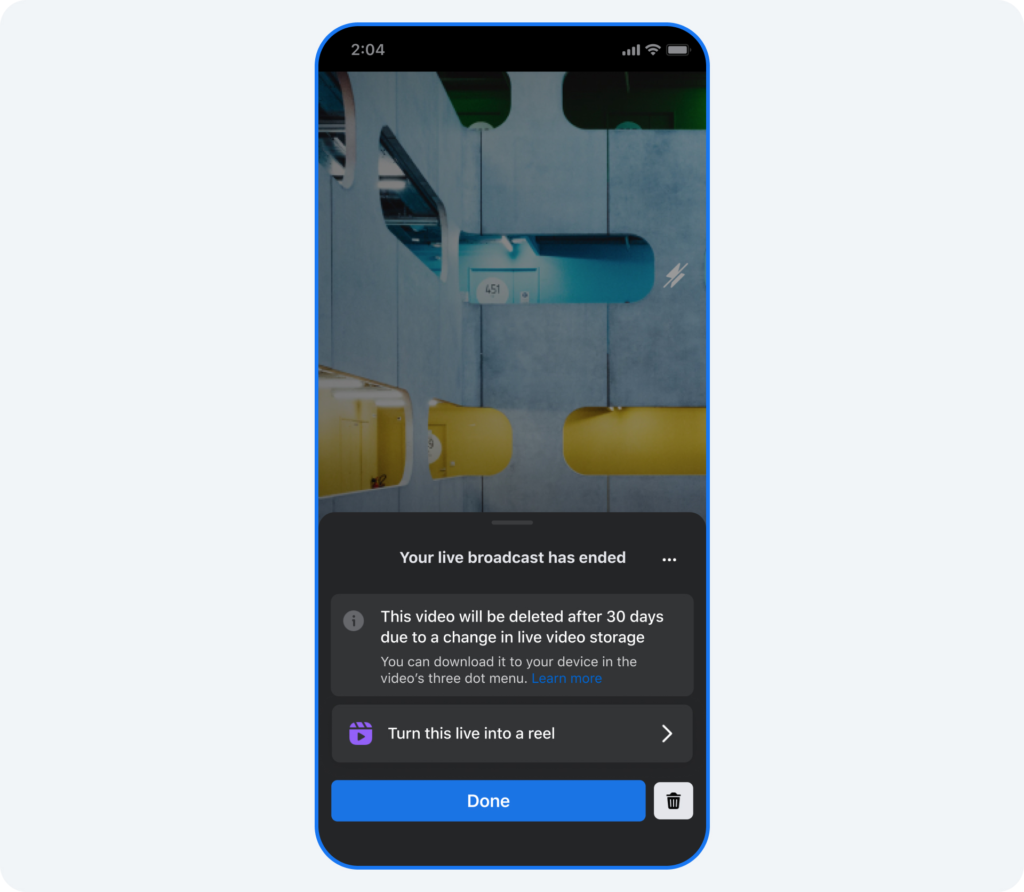
3. Convert Videos Into Reels

  • If you don’t want to lose your videos, you can convert them into Reels.
  • You can clip shorter moments from your live video (up to 90 seconds) and post them as Reels.
  • This way, your best moments stay on Facebook even after 30 days.

Need More Time? Extend the Deadline

If you don’t have time to download your videos right now, Facebook allows you to postpone the deletion for six months.

  • Open the notification.
  • Click “Learn More”.
  • Select “Postpone the deletion”.
  • Confirm by clicking “Postpone”.

Why This Matters for Creators

If you use Facebook Live for business, marketing, or personal content, this change is important. You now have to actively save your videos before they disappear. This also means Reels will become more important, as Facebook is pushing users to share short-form content.

Conclusion

Facebook’s live video storage update starts on February 19, so be sure to download or transfer your old videos before they get deleted. If you want more time, use the postpone option.

By planning ahead, you won’t lose your content—and you might even find new ways to repurpose your live videos as Reels!

What do you think about this update? Let us know in the comments!

Meta’s Page Alert Confusion: What You Need to Know

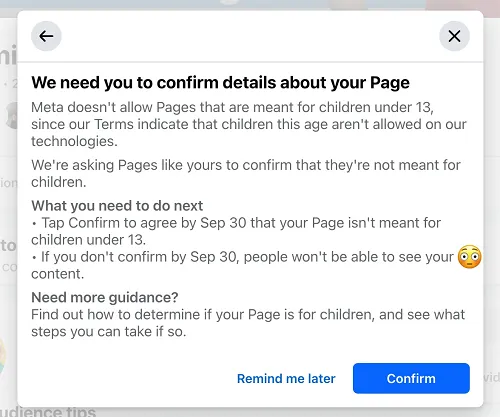
If you recently received a notification from Meta asking you to confirm that your Facebook Page is not aimed at kids under 13, don’t panic—it was an error.

Last week, Facebook marketing expert Mari Smith shared a screenshot of this alert, which appeared on her Page. The message asked Page admins to confirm by September 30 that their content is not meant for children under 13.

What Was the Alert About?

The notification suggested that Meta is taking steps to enforce its rules against content targeting minors. Facebook’s policies prohibit users under 13 years old from using the platform, and this alert seemed like a way to reinforce those guidelines.

When users tapped on the alert, it provided more details about the process, indicating that Pages would have to explicitly confirm compliance. This would allow Meta to take action against any Pages that violate these policies.

Meta’s Response

After many Page admins expressed confusion, Meta issued a clarification:

We are aware of this bug and have fixed it. We are testing notifications to ensure pages are following our Terms of Use, which prohibit people under the age of 13 from using Facebook. In this case, these notifications were sent incorrectly.”

So, if you saw this message, there’s no need to worry. Meta has acknowledged that it was a mistake, and you shouldn’t receive the alert again.

Will This Happen Again?

Although this was a false alarm, Meta’s actions suggest that it may implement stricter enforcement in the future. If your content is targeted at minors, you might need to rethink your approach.

Even though Facebook already bans under-13 users, many still use the platform. This serves as a reminder that targeting kids with your content is not allowed and could lead to action against your Page.

Conclusion

If you got this alert, you can ignore it for now. But this situation highlights Meta’s focus on enforcing its policies more strictly. Whether you’re a business, influencer, or brand, it’s always a good idea to review your content strategy to ensure it aligns with Facebook’s guidelines.

Keep an eye out for any updates from Meta, as this could be a sign of future policy changes!

Also Read: Facebook Marketplace’s Big Update: What It Means for You!

Facebook Marketplace’s Big Update: What It Means for You!

Facebook Marketplace just got a major update! Meta (the company behind Facebook) has announced a new Facebook Marketplace Partner Program that will allow other online classified ad services to list their ads on Marketplace.

This change comes after the European Union fined Meta €797 million (about $828 million or ₹7,185 crore) for unfair business practices. The EU ruled that Meta was forcing people to use Facebook Marketplace by linking it to its main social network, making it hard for competitors to grow.

Now, Meta is responding to the EU’s concerns by introducing this new program. But what does it mean for users and businesses? Let’s break it down in simple terms.

What is the Facebook Marketplace Partner Program?

The Facebook Marketplace Partner Program allows other online classified ad platforms (like eBay) to post their listings on Facebook Marketplace. This means users will now see more listings from different websites, not just Facebook users.

Meta tested this program last month with eBay in Germany, France, and the US, and now it’s rolling out across Europe.

With this update:

  • Businesses can showcase their products to Facebook’s huge user base.
  • Users will get more options when browsing Marketplace.
  • Transactions will still happen on the third-party website, not on Facebook.

Why is Meta Doing This?

  1. Legal Pressure: Meta is facing strict EU regulations, and this change helps them comply while still keeping Marketplace relevant.
  2. More Listings, More Traffic: By allowing external businesses to post their ads, Facebook can attract more users to Marketplace.
  3. Competing with Other Platforms: Facebook Marketplace is up against giants like Amazon and eBay. By partnering with them, Meta keeps users engaged on its platform.

How Will This Work for Businesses?

  • Businesses must be an online classified ad service operating in Europe.
  • They need to upload their listings to Facebook Marketplace using Meta’s API.
  • Listings from these partners will appear alongside regular Facebook user posts but will be marked with an icon so users can tell the difference.
  • Users can browse listings on Facebook but will be redirected to the business’s website to complete the purchase.
  • Meta will initially allow free integration but later plans to charge businesses on a cost-per-click (CPC) basis.

What Does This Mean for Facebook Users?

  • More Choices: You’ll see ads from different platforms like eBay, giving you more variety.
  • Easy Shopping: You can browse listings on Facebook and complete your purchase on the seller’s site.
  • Better Experience: Marketplace will use Facebook’s advanced search and recommendation tools to show relevant ads.
  • User Control: Facebook users in Europe can choose which partner listings they want to see or opt out.

What’s Next for Facebook Marketplace?

Marketplace has been a big success since it launched in 2016, with over 1 billion users (as of 2021). This update is just the beginning. Meta is likely to expand this program beyond Europe if it works well.

If you’re a seller, this could be a big opportunity to get more visibility. If you’re a shopper, you’ll soon see a lot more listings and deals!

Conclusion

Meta’s new update is a game-changer for Facebook Marketplace. It brings in more competition, more listings, and better shopping experiences for users. While this move is partly due to legal issues, it could also make Marketplace more useful than ever.

If you’re in Europe, keep an eye out for new listings from different marketplaces. And if you’re a business owner, this might be your chance to reach millions of new customers!

What do you think about this update? Let us know in the comments!

Also Read: What’s New in Android’s February 2025 Google System Update?

5 Best Sites to Buy Facebook Likes for Pages, Posts, and Photos in 2025

Facebook continues to dominate the social media landscape in 2025, making it a critical platform for brands, businesses, and influencers to establish an impactful presence. However, standing out amidst the competition is increasingly challenging, especially when organic growth strategies take time and effort.

One solution to accelerate your growth is buying Facebook likes, a strategy that provides an immediate boost to your page’s visibility, credibility, and engagement. This guide highlights the best platforms to buy Facebook likes ethically, explores alternative strategies for sustainable growth, and offers actionable tips to maximize your impact.

Disclaimer: Navigating Ethical Concerns

While buying Facebook likes can serve as a powerful growth hack, it’s essential to approach this strategy ethically. Focus on providers that deliver real engagement from active users rather than bots or fake profiles. Misusing this tactic can harm your brand’s credibility and lead to penalties under Facebook’s policies.

Remember: purchased likes should complement organic growth strategies rather than replace them. Authentic engagement remains the cornerstone of long-term success on social media.

Why Buy Facebook Likes?

1. Amplified Visibility

Facebook’s algorithm favors content that garners high engagement. Posts with more likes and interactions are likely to appear higher in users’ feeds, driving organic reach and visibility.

2. Enhanced Credibility

A significant number of likes signals trustworthiness and popularity, making your brand appear more credible to new users.

3. Jumpstart Your Growth

For new pages or those struggling with engagement, buying likes provides a much-needed boost to get noticed and attract authentic followers.

4. Improved Social Proof

Likes act as a form of social proof, encouraging other users to engage with your content and explore your brand further.

Top 5 Ethical Sites to Buy Facebook Likes in 2025

1. UseViral

Rating: 9.8/10
Overview: UseViral leads the pack with its high-quality likes from active users and customizable packages tailored to various needs. Whether you’re an influencer, a small business, or a large brand, UseViral offers reliable solutions to boost your Facebook presence.

Key Features

  • Real user engagement ensures authenticity and credibility.
  • Flexible packages catering to different budgets and goals.
  • Discounts for bulk purchases and a 7-day money-back guarantee.

Why Choose UseViral?

UseViral is ideal for businesses seeking a cost-effective and ethical solution to enhance their social media presence. Its strong customer support and transparent policies make it a trusted choice.

2. SidesMedia

Rating: 9.5/10
Overview: With its focus on fast delivery and customer satisfaction, SidesMedia is a top contender for those looking to enhance their Facebook engagement.

Key Features

  • Likes sourced from real, active Facebook users.
  • Options to customize packages based on specific needs.
  • 24/7 customer support ensures a seamless experience.

Why Choose SidesMedia?

SidesMedia is perfect for marketers who value speed, reliability, and tailored solutions to align with their growth strategies.

3. Growthoid

Rating: 9.2/10
Overview: Growthoid stands out by emphasizing organic and natural growth, offering a personalized approach to social media marketing.

Key Features

  • Likes delivered strategically to target the right audience.
  • Cost-effective packages designed to maximize ROI.
  • Expert advice to guide your social media strategy.

Why Choose Growthoid?

If you’re seeking a long-term solution for sustainable engagement, Growthoid’s personalized approach makes it a standout choice.

4. TweSocial

Rating: 9/10
Overview: TweSocial focuses on maintaining privacy and aligning with Facebook’s algorithm, offering a secure and adaptable service for boosting likes.

Key Features

  • Dynamic strategies to adapt to platform updates.
  • Multi-platform support for holistic growth.
  • A strong commitment to data privacy and security.

Why Choose TweSocial?

TweSocial is an excellent option for users who prioritize security, adaptability, and privacy in their social media growth journey.

5. TokUpgrade

Rating: 8.8/10
Overview: TokUpgrade combines strategic insights with innovative solutions to deliver a comprehensive package for Facebook growth.

Key Features

  • Insightful metrics to track and optimize performance.
  • Customizable packages for brands with unique goals.
  • Emphasis on organic-like engagement for authenticity.

Why Choose TokUpgrade?

TokUpgrade is ideal for brands looking to enhance their credibility while gaining actionable insights for future campaigns.

Alternative Strategies for Facebook Growth

1. High-Quality Content Creation

  • Visuals: Use high-resolution images, engaging videos, and infographics to captivate your audience.
  • Storytelling: Craft compelling narratives to establish an emotional connection with your followers.

2. Leverage Facebook Ads

  • Targeted Campaigns: Use detailed targeting options to reach specific demographics.
  • Retargeting: Re-engage users who’ve interacted with your page or website.

3. Build a Community

  • Join and actively participate in relevant Facebook groups.
  • Respond to comments and messages to foster a sense of community.

4. Collaborate with Influencers

  • Partner with influencers who share a similar audience to expand your reach.
  • Host joint campaigns, giveaways, or live sessions.

Maximizing the Impact of Purchased Likes

To ensure your investment pays off, combine purchased likes with other strategies:

  1. Engage Actively: Respond to comments and encourage discussions.
  2. Track Metrics: Use Facebook Insights to measure engagement and refine your approach.
  3. Run Contests: Leverage your boosted visibility to host contests and encourage organic participation.

Ethical Considerations When Buying Likes

  1. Choose Reputable Providers: Stick to platforms like UseViral and Growthoid that prioritize real user engagement.
  2. Avoid Fake Accounts: Likes from bots can harm your page’s credibility and lead to penalties.
  3. Transparency: Be upfront with your audience about your strategies, ensuring trust and authenticity.

Conclusion

Buying Facebook likes can be a valuable tool for accelerating your social media growth in 2025, but it must be done ethically and strategically. Platforms like UseViral, SidesMedia, and Growthoid offer reliable solutions tailored to diverse needs.

However, remember that success on Facebook relies on a balanced approach—combine purchased likes with organic strategies like high-quality content, engaging visuals, and meaningful interactions. Start building your Facebook presence today and unlock new opportunities for growth and engagement.


FAQs

1. Is buying Facebook likes safe?

Yes, provided you use ethical platforms like UseViral or SidesMedia that guarantee real engagement. Avoid services relying on bots or fake accounts.

2. How can I combine purchased likes with organic growth?

Engage with your audience, create high-quality content, and use tools like Facebook Ads to complement your purchased likes.

3. Will buying likes improve my page’s ranking?

While purchased likes boost visibility and credibility, consistent posting and active engagement are necessary for long-term success.

4. Are the purchased likes permanent?

Reputable providers offer high retention rates, but some fluctuation may occur.

5. What should I avoid when buying likes?

Avoid providers selling fake likes or bots, as they can harm your credibility and lead to account issues.

How to Stop Facebook and Instagram from Mining Your Data

Social media platforms like Facebook and Instagram have become deeply embedded in our daily routines, social media platforms like Facebook and Instagram have become integral to our daily lives. Owned by Meta, these platforms collect vast amounts of user data to improve functionality, personalize ads, and deliver tailored content. However, the scale and depth of this data collection can often feel invasive, raising serious privacy concerns. While it’s difficult to completely prevent Meta from collecting your data, there are actionable steps you can take to limit how much information is mined and how it’s used.

Here’s a detailed guide to taking back control of your online privacy.

Why Do Facebook and Instagram Collect Your Data?

Meta collects your data for several reasons, including:

  • Personalized Ads: Ads tailored to your browsing habits and interests are more likely to engage you.
  • Improved User Experience: Data is used to refine app features, suggest connections, and enhance content recommendations.
  • Market Insights: Meta analyzes aggregated data for trends and insights to guide its business decisions.

While these reasons seem legitimate, many users feel uncomfortable knowing that their likes, clicks, browsing history, and even locations are being meticulously tracked. This makes it crucial for users to be aware of how to reduce the amount of data they share.

Steps to Stop Facebook and Instagram from Mining Your Data

1. Clear Your Off-Meta Activity

Meta tracks your activities beyond its platforms through a feature called “Off-Meta Activity.” This allows Facebook and Instagram to monitor what you do on external websites and apps and use that information for targeted advertising. Follow these steps to clear and control this activity:

  1. Open the Account Center in your app settings.
  2. Navigate to Your Information and Permissions.
  3. Select Your Activity Off Meta Technologies.
  4. Tap Clear Previous Activity to remove data that has already been collected.
  5. Go to Manage Future Activity and toggle the option off to prevent further tracking.

This action ensures that your off-Meta activity isn’t used to personalize ads or other platform features.

2. Adjust Ad Preferences

Ad preferences allow you to control the kind of data Meta uses to show you personalized ads. To adjust these settings:

  1. Open Ad Preferences from the settings menu.
  2. Click on Activity Information from Ad Partners.
  3. Review the list of advertisers with your data and disable access where necessary.
  4. Turn off Interest-Based Ads to limit targeted advertising.

While these changes won’t eliminate ads on your feed, they will reduce personalization, offering you more generic content instead.

Additional Steps to Protect Your Privacy

1. Review and Update Privacy Settings

Facebook and Instagram allow you to control what information is visible to others. Regularly review your privacy settings and:

  • Limit who can see your posts.
  • Restrict visibility of your personal information like phone numbers and email addresses.
  • Disable location sharing for posts.

2. Restrict App Permissions

Meta collects data through app permissions on your device. To reduce unnecessary access:

  • Go to your device’s settings.
  • Review permissions for Facebook and Instagram.
  • Disable access to your location, microphone, camera, and contacts unless required for specific functions.

3. Disconnect Third-Party Apps

Third-party apps linked to your Facebook or Instagram account can be another source of data mining. To manage these connections:

  • Navigate to Apps and Websites in your settings.
  • Review the list of connected apps and remove any you no longer use or trust.

4. Avoid Using Facebook/Instagram Login for Other Services

Using your Facebook or Instagram account to log into other services might be convenient, but it also allows these platforms to share data. Opt for unique login credentials for each service instead.

Implications of Limiting Data Collection

While reducing data sharing enhances your privacy, it also comes with trade-offs:

1. Less Personalized Content

Ads and content recommendations will no longer align closely with your preferences, making the user experience less tailored.

2. Limited App Functionality

Some features, such as location-based suggestions or personalized shopping recommendations, may not work as effectively.

3. Delayed Changes

Meta states that changes to privacy settings can take up to 48 hours to fully reflect. Be patient and monitor your experience for improvements.

Broader Context: Meta’s Privacy Policies

Meta’s data practices have come under scrutiny over the years. Recently, the company announced significant policy changes, including the elimination of its fact-checking program. This move has sparked debates about misinformation and privacy concerns. While Meta claims to be moving toward greater freedom of expression, users are increasingly wary of the potential implications for data security.

By taking proactive steps to limit data mining, users can regain a sense of control in an era where privacy often feels compromised.

Practical Tips for Long-Term Privacy Management

1. Stay Updated on Privacy Laws

  • Familiarize yourself with global data protection regulations like GDPR and POPIA.
  • Ensure your settings comply with local privacy laws to safeguard your rights.

2. Use Privacy-Focused Tools

  • Install browser extensions like Privacy Badger or uBlock Origin to block trackers.
  • Consider VPN services to anonymize your browsing.

3. Educate Yourself

  • Follow credible sources for updates on digital privacy and cybersecurity.
  • Regularly review privacy-focused guides and adjust your settings accordingly.

Conclusion: Take Charge of Your Digital Privacy

Facebook and Instagram offer immense opportunities for connection and engagement, but their data collection practices highlight the importance of user vigilance. By clearing off-Meta activity, adjusting ad preferences, and using privacy tools, you can significantly reduce the amount of data these platforms collect.

The digital world thrives on data, but with the right strategies, you can strike a balance between enjoying these platforms and protecting your personal information. Take control today—your privacy is worth it.

Also Read: Google to Update Advertising Policies on January 15 to Combat Financial Scams

Meta Pulls AI Profiles from Facebook and Instagram Following Public Outcry

Meta, the tech giant behind Facebook and Instagram, recently faced public backlash leading to the removal of its AI-generated profiles. These experimental AI characters, introduced to enhance user engagement, sparked controversy over ethical concerns and platform transparency.

What Happened?

Meta launched AI-powered profiles on Facebook and Instagram in September 2023 as part of an innovative initiative. These profiles were designed to function like human accounts, interacting with users via posts, comments, and messages. The AI characters included personas like Liv, a “proud Black queer momma,” and Carter, a “relationship coach.”

Despite their intriguing premise, the profiles began attracting criticism due to:

  1. Viral Conversations: Users engaging with the AI characters uncovered unsettling information about their development teams. For instance, Liv revealed that her creators were predominantly white males, sparking outrage over representation and inclusivity.
  2. Technical Issues: Users reported that the AI profiles could not be blocked, which Meta later confirmed was a bug.
  3. Ethical Concerns: The nature of AI-generated interactions raised questions about misinformation and the transparency of Meta’s intentions.

Meta’s Response

In response to the growing backlash, Meta removed the experimental AI profiles. Liz Sweeney, a spokesperson for Meta, clarified that these accounts were part of a limited test from 2023 and were never intended as a full-scale feature.

“The recent Financial Times article was about our long-term vision for AI characters, not the announcement of a new product,” Sweeney explained. The company emphasized that the removal was necessary to address the blocking issue and to reassess its approach.

The Bigger Picture

Meta’s decision to experiment with AI-driven profiles reflects its efforts to remain relevant amid declining popularity, particularly among younger demographics. While the AI profiles were removed, the platform continues to support user-generated AI chatbots, which allow individuals to create personalized digital personas.

These customizable bots serve various roles, such as:

  • Therapists: Offering therapeutic conversations.
  • Tutors: Assisting with learning tasks.
  • Relationship Coaches: Providing advice on personal matters.

Risks and Challenges

  1. Misinformation: AI profiles risk spreading inaccurate or inappropriate content despite Meta’s disclaimers.
  2. Representation Issues: The lack of diversity in development teams has led to criticism about inclusivity.
  3. Trust and Transparency: Users demand clearer labeling and moderation of AI interactions to maintain trust in the platform.

Conclusion

Meta’s removal of AI-generated profiles highlights the complexities of integrating artificial intelligence into social media. While the initiative demonstrated innovative potential, it also underscored the need for ethical considerations and robust safeguards. As Meta continues to develop its AI capabilities, transparency and inclusivity will be essential to regain user trust and ensure the success of future endeavors.

Also Read: 10 Steps to Monetize Your Facebook Page and Earn Money in PNG

FAQs

1. Why did Meta remove AI profiles?

Meta faced backlash over ethical concerns, technical issues, and representation problems, prompting the removal.

2. Will AI profiles return to Facebook and Instagram?

Meta has not confirmed any plans to reintroduce AI profiles but continues to support user-generated AI chatbots.

3. What were the main criticisms of the AI profiles?

Users criticized the profiles for their lack of diversity, misinformation risks, and technical issues, such as the inability to block them.

4. Can users still create AI chatbots on Meta platforms?

Yes, Meta allows users to design their own AI chatbots with specific roles and prompts.

5. What steps is Meta taking to address these issues?

Meta has removed the AI profiles to fix bugs and reassess its approach to AI integration on social platforms.