The Power of Instagram Reels: Tips for Marketers

Instagram Reels is one of the biggest opportunities for brands in 2025. With Instagram’s algorithm prioritizing Reels, businesses can reach millions for free, boost engagement, and even drive sales—all without spending money on ads.

But just posting random videos won’t work. Reels need a strategy. You must create content that grabs attention, keeps viewers watching, and encourages them to take action.

Why does this matter? Because short-form video is the future of social media. Platforms like TikTok, YouTube Shorts, and Facebook Reels are growing fast, and Instagram Reels is leading the way. If your business isn’t using Reels, you’re missing out on potential customers who prefer video over text and images.

In this guide, we’ll break down how to create high-performing Instagram Reels that get more views, engagement, and sales. Let’s dive in!

Why Instagram Reels Matters for Marketers

  • Huge Organic Reach – Unlike regular posts, Reels get more visibility.
  • Boosts Engagement – Fun, short videos get more likes, shares, and comments.
  • Better Discoverability – Reels appear on the Explore page, helping you reach new people.
  • Increases Sales – Use product demos, behind-the-scenes clips, and testimonials to convert viewers into customers.

How to Create High-Performing Instagram Reels

1. Start with a Strong Hook

People scroll fast. Your first 3 seconds should grab attention and make them stop.

  • Ask a question
  • Show an exciting visual
  • Use bold text or a powerful statement

2. Keep It Short and Engaging

Instagram favors short, high-energy videos. Keep your Reels 10-30 seconds long for the best performance.

  • Cut out unnecessary parts.
  • Add fast transitions to keep it exciting.
  • Use jump cuts for a snappy feel.

3. Use Trending Music and Effects

Instagram promotes Reels that use popular music and effects. This boosts visibility.

  • Check the Trending Sounds section.
  • Sync video edits with the beat of the music.

4. Add Text and Captions

Not everyone watches with sound. On-screen text and captions increase engagement.

  • Summarize key points.
  • Highlight product names or features.
  • Use bold, easy-to-read fonts.

5. Include a Clear Call-to-Action (CTA)

Tell viewers what to do next:

  • “Follow for more tips!”
  • “Shop now – link in bio!”
  • “Tag a friend who needs this!”

A strong CTA helps convert viewers into followers and customers.

Advanced Tips to Boost Instagram Reels Performance

1. Post at the Right Time

Timing matters. Post when your audience is most active.

  • Check Instagram Insights to find peak times.
  • Experiment with different posting schedules.

2. Use Hashtags Wisely

Hashtags help Instagram show your Reels to the right audience.

  • Use 5-10 relevant hashtags.
  • Mix broad hashtags (#Marketing, #Business) with niche hashtags (#SocialMediaTips, #ReelsGrowth).

3. Engage with Comments & DMs

The more interaction your Reel gets, the more Instagram pushes it.

  • Reply to every comment.
  • Ask a question in your caption to spark conversation.
  • Engage with similar Reels to boost visibility.

4. Repurpose Reels Across Platforms

Reels work on more than just Instagram. Share them on:

  • Facebook Reels
  • TikTok
  • YouTube Shorts
  • Pinterest Idea Pins

This maximizes reach and gives your content more life.

Conclusion

Instagram Reels is a powerful tool to grow your brand fast. By creating engaging, high-quality videos with the right strategy, you can increase reach, build your audience, and drive more sales.

Action Step: Pick one idea from this list and create your next Reel today!

Want more social media marketing tips? Stay tuned for expert insights!

Instagram Introduces DM Scheduling: A Game-Changer for Messaging

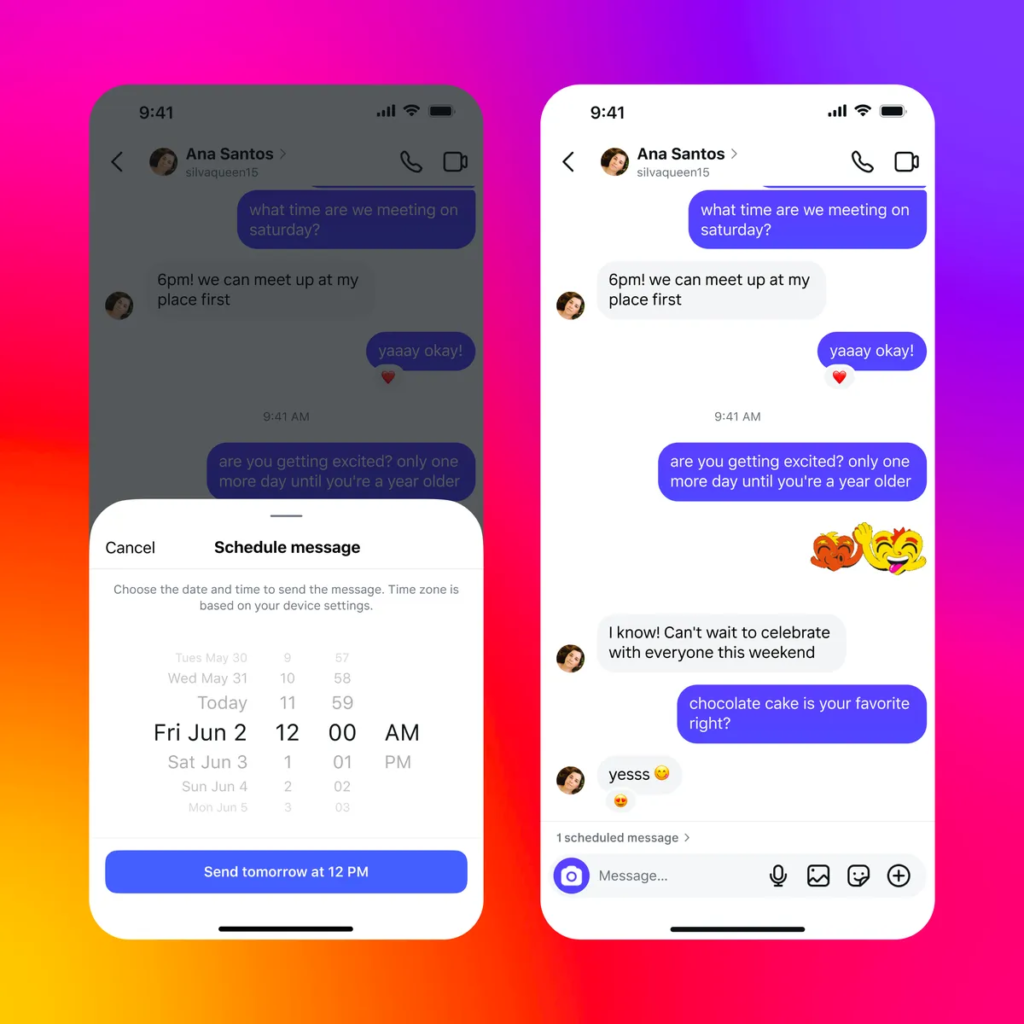
Instagram has rolled out a highly anticipated feature that allows users to schedule direct messages (DMs) in advance. This update is designed to enhance the messaging experience by enabling users to send messages at the most convenient time—without worrying about interrupting their friends or missing important moments.

Alongside this new feature, Instagram has also introduced QR code chat invitations, message pinning, and in-chat translation, making DMs more functional and user-friendly. Let’s explore how these updates improve communication and engagement on the platform.

Instagram’s New DM Scheduling Feature: How It Works

The DM scheduling feature allows users to write a message and select a future date and time for it to be sent automatically. This is particularly useful for:

  • Sending birthday wishes or reminders without forgetting.
  • Coordinating messages across different time zones.
  • Avoiding interruptions when a recipient might be busy.

How to Schedule a DM on Instagram

  1. Open Instagram DMs and type your message.
  2. Hold down the send button until the scheduling option appears.
  3. Select a date and time to send the message.
  4. Confirm the scheduled message, which will appear in the chat with an option to edit or cancel it.

Key Features of Instagram DM Scheduling

Messages can be scheduled up to 29 days in advance.
Text-only messages can be scheduled (images and videos are not supported yet).
Users can schedule messages to themselves as reminders.
The feature is built directly into Instagram’s messaging interface for easy access.

Other New Instagram DM Features

1. QR Code Chat Invitations

  • Users can generate a QR code to invite others to a chat instantly.
  • Makes it easier to start group discussions without sharing usernames.

2. Message Pinning

  • Users can pin important messages to the top of a chat for quick reference.
  • Useful for saving key details like addresses, plans, or reminders.

3. In-Chat Language Translation

  • Allows users to translate messages directly within a DM conversation.
  • Enhances global communication and removes language barriers.

Why Instagram’s DM Updates Matter

1. Better Communication Across Time Zones

  • Scheduling ensures that messages reach recipients at appropriate times, especially for users with friends and family abroad.

2. More Organized Messaging

  • Message pinning and scheduled messages help keep conversations structured and accessible.

3. Greater User Control and Privacy

  • With the ability to schedule messages, users no longer need to send messages immediately and risk disturbing someone.

Potential Limitations and Future Improvements

Current Limitations

  • DM scheduling is only available for text messages (no support for media yet).
  • Users cannot edit scheduled messages after setting them (only cancel and resend).
  • Feature rollout may be gradual, so not all users have access immediately.

Expected Future Updates

  • Adding support for images, videos, and voice messages in scheduled DMs.
  • More advanced scheduling options, such as recurring messages for reminders.
  • Integration with Instagram Stories or Notes for scheduled social interactions.

Final Thoughts

Instagram’s new DM scheduling feature is a welcome addition, offering users more control over their conversations and making it easier to communicate without interruptions. Alongside QR code invites, pinned messages, and in-chat translations, Instagram is clearly focusing on enhancing its messaging capabilities.

With more updates expected in the future, these features could transform how users interact and engage on Instagram, making the platform a more efficient and user-friendly communication tool.

Also Read: How to Stop Instagram and Facebook from Tracking Your Internet Activity


Frequently Asked Questions (FAQs)

1. How do I schedule a message on Instagram?

Hold down the send button in a DM, select a date and time, and confirm the scheduled message.

2. Can I edit a scheduled message?

No, but you can delete and resend a new scheduled message.

3. Can I schedule DMs with images or videos?

Currently, only text messages can be scheduled.

4. How far in advance can I schedule a message?

You can schedule a message up to 29 days ahead.

5. Is DM scheduling available to all users?

Instagram is gradually rolling out this feature, so availability may vary.

How to Stop Instagram and Facebook from Tracking Your Internet Activity

Meta, the parent company of Instagram and Facebook, has long faced criticism for tracking user activity across websites and apps. This data collection is used for targeted advertising, often leading users to see ads related to their recent online searches.

To address these privacy concerns, Meta has introduced a feature called “Activity Off-Meta Technologies”, allowing users to manage and restrict how much of their online activity is shared with these platforms. This guide will walk you through how to stop Instagram and Facebook from tracking your internet activity and regain control of your data.

What is Activity Off-Meta Technologies?

Activity Off-Meta Technologies is a privacy feature that lets users:
View and manage data that businesses share with Meta.
Disconnect specific websites and apps from tracking their activity.
Clear previously collected data.
Prevent future tracking of online behavior.

This tool is crucial for users who want to reduce personalized ads and increase privacy across Facebook and Instagram.

How to Stop Instagram from Tracking Your Activity

Step 1: Open Instagram Settings

  1. Open the Instagram app and tap your profile picture in the bottom-right corner.
  2. Tap the three horizontal lines (menu) in the top-right corner.
  3. Select “Settings and Privacy” from the menu.

Step 2: Manage Activity Off-Meta Technologies

  1. Scroll down to “Activity” and tap “Activity Off-Meta Technologies”.
  2. Toggle “Disconnect Future Activity” to prevent Instagram from tracking your activity on other apps and websites.

Step 3: Delete Past Activity

  1. From the “Activity Off-Meta Technologies” page, tap “Your Information and Permissions”.
  2. Select “Your Activity off Meta Technologies” to manage past data.
  3. You can:
    • See recent activity Meta has tracked.
    • Disconnect specific apps and websites from sharing data.
    • Clear previously collected information.
    • Manage future tracking preferences.

If you enable “Disconnect Future Activity”, it will automatically delete past data as well.

How to Stop Facebook from Tracking Your Activity

Step 1: Access Facebook Settings

  1. Open the Facebook app and tap the menu icon (three lines) in the top-right corner.
  2. Scroll down and select “Settings & Privacy”, then tap “Settings”.

Step 2: Manage Off-Facebook Activity

  1. Scroll to “Your Facebook Information” and tap “Off-Facebook Activity”.
  2. Here, you can view a list of businesses that have shared your activity with Facebook.

Step 3: Disconnect and Clear Data

  1. Tap “Manage Your Off-Facebook Activity”.
  2. Select “Clear History” to remove previously collected data.
  3. Toggle “Disconnect Future Activity” to stop Facebook from tracking your interactions with third-party sites and apps.

Why Should You Disable Tracking?

1. Increased Privacy Protection

  • Meta collects vast amounts of user data to personalize ads. Disabling tracking helps limit this intrusive data collection.

2. Fewer Targeted Ads

  • Without tracking, you will see fewer ads based on your browsing history, making your experience less influenced by online activity.

3. Greater Control Over Your Data

  • Users can review, manage, and delete their activity, preventing businesses from using personal information without consent.

Limitations of Disabling Tracking

  • You may still see ads, but they will be less personalized.
  • Some websites and apps may require tracking for login or features.
  • Meta still collects limited data based on in-app activity (such as posts you like or accounts you follow).

Despite these limitations, managing Activity Off-Meta Technologies significantly reduces unnecessary data sharing.

Final Thoughts

Meta’s tracking practices have raised privacy concerns for years, but with the Activity Off-Meta Technologies feature, users now have the option to regain control over their online data. By following these simple steps on Instagram and Facebook, you can limit how much of your internet activity is shared with advertisers and businesses.

Taking these steps ensures that your personal data remains private, making your social media experience more secure and less intrusive.

Also Read:


Frequently Asked Questions (FAQs)

1. Does disabling tracking stop all ads on Instagram and Facebook?

No, you will still see ads, but they will be less personalized and not based on your external browsing history.

2. Can Meta still collect my data after I disable tracking?

Yes, Meta can still track in-app interactions, such as likes, follows, and searches, but it will no longer track your activity outside of Instagram and Facebook.

3. Will this setting remove all past data Meta has collected?

Yes, if you select “Disconnect Future Activity”, it will also clear past activity data.

4. Can I turn tracking back on later?

Yes, you can go back to Activity Off-Meta Technologies settings and re-enable tracking at any time.

Why Are Instagram Influencers More Popular Than Celebrities?

Social media has transformed the way people consume content, interact with brands, and follow personalities. With Instagram evolving into a shopping-driven and video-first platform, influencers have taken center stage, often surpassing traditional celebrities in popularity.

Brands are now favoring Instagram influencers over A-list celebrities due to their authenticity, relatability, and strong audience engagement. But why exactly are influencers gaining more traction than mainstream celebrities? Let’s break it down.

The Rise of Instagram Influencers

Instagram influencers have reshaped digital marketing and brand partnerships by creating personalized, engaging, and relatable content. Unlike traditional celebrities, influencers:

  • Build direct and personal relationships with their audience.
  • Create niche-specific content that aligns with their followers’ interests.
  • Provide real-time engagement through stories, live sessions, and interactive posts.

The Attention Economy & Social Commerce

The rise of the attention economy has fueled influencer dominance. With short-form videos, interactive content, and AI-driven recommendations, influencers can easily capture and retain audience attention.

Additionally, Instagram has become a major player in social commerce, allowing users to buy products directly from posts and stories. Consumers trust influencers’ recommendations more than traditional ads, making them powerful brand ambassadors.

Gen Z and Millennials Prefer Influencers Over Celebrities

Gen Z (ages 10-25) and Millennials (ages 26-41) are the driving force behind influencer popularity. According to McKinsey & Company, Gen Z makes up 40% of online consumers, and they prefer brands that align with their values and interests.

Why Does Gen Z Trust Influencers More?

  1. Relatability & Accessibility
    • Unlike celebrities, influencers come from diverse backgrounds and share real-life experiences.
    • Their content is authentic, unscripted, and unfiltered, making it more relatable to their followers.
  2. Community Engagement
    • Influencers actively engage with their followers through comments, DMs, and Q&A sessions.
    • Live streams and personal interactions create a strong sense of community.
  3. Trendy & Entertaining Content
    • Influencers jump on viral trends and create engaging content like memes, challenges, and short-form videos.
    • Their content feels fresh, entertaining, and organic, unlike scripted celebrity endorsements.

Brands Prefer Influencers for Marketing Campaigns

Influencer marketing is more cost-effective, targeted, and measurable than celebrity endorsements. Here’s why brands are shifting their focus:

  1. Higher Engagement & ROI
    • Influencers generate more engagement than traditional celebrities due to their interactive content.
    • Brands see higher conversion rates from influencer promotions compared to standard ads.
  2. Niche Marketing & Personalization
    • Influencers have dedicated audiences in specific niches (e.g., fashion, fitness, beauty, tech).
    • Brands can target their ideal consumers through influencer collaborations.
  3. Authenticity Drives Conversions
    • Consumers trust influencer recommendations more than traditional celebrity endorsements.
    • 85% of Gen Z trusts influencer recommendations, compared to just 27% for celebrity ads.

The Competitive Edge of Influencers Over Celebrities

FeatureInstagram InfluencersTraditional Celebrities
AuthenticityHigh – Share real-life experiencesLow – Often scripted promotions
EngagementDirect interaction via comments, DMs, and live sessionsLimited engagement, mostly through PR teams
Niche ContentFocused on specific interests (beauty, fitness, tech, etc.)General appeal, lacks niche expertise
Trust & RelatabilityHighly relatable and accessibleDistant and aspirational
Affordability for BrandsCost-effective, flexible pricingExpensive, limited contracts
Real-Time EngagementFrequent live sessions, Q&As, and updatesOccasional interviews and brand events

How Influencers Are Changing Social Media Marketing

With Instagram becoming a powerful e-commerce platform, influencers are directly impacting purchasing decisions. Here’s how they are reshaping digital marketing:

  • Affiliate Marketing: Influencers promote products using discount codes, encouraging immediate purchases.
  • User-Generated Content: Followers create content featuring products, increasing brand credibility.
  • Live Shopping: Instagram influencers host live shopping events, offering real-time product reviews and demonstrations.

Will Celebrities Become Obsolete in Digital Marketing?

While celebrities still hold influence, their role in digital marketing is shifting. Luxury brands and high-end endorsements still favor celebrities, but for mass-market brands, influencers offer higher engagement, authenticity, and ROI.

Instead of completely replacing celebrities, influencers and celebrities may co-exist in digital marketing, with influencers driving everyday consumer purchases and celebrities handling high-profile luxury endorsements.

Conclusion: The Future Belongs to Influencers

Instagram influencers have outpaced celebrities in digital influence due to their authenticity, relatability, and direct engagement with followers. As brands shift towards community-driven marketing, influencers will continue to dominate social media, reshaping how businesses connect with consumers.

For brands, leveraging influencer partnerships can drive higher engagement, trust, and conversions, making them the future of digital marketing.

Final Thought:

Will influencers completely replace celebrities in marketing? Probably not. But one thing is certain—Instagram influencers have redefined the way brands engage with consumers, making them more powerful than ever before.

Also Read: Key Trends Driving Digital Marketing Evolution in South Africa in 2025

Instagram’s New Music-Sharing Feature in DMs – Here’s How It Works!

In an era where music plays a crucial role in self-expression, Instagram has taken a step forward by integrating a brand-new music-sharing feature into Direct Messages (DMs). This feature allows users to send 30-second song previews within chats, making conversations more engaging and personalized.

Whether you’re recommending a favorite track, introducing a new artist, or simply expressing your mood, Instagram’s latest update makes sharing music effortless and fun.

What is Instagram’s Music-Sharing Feature?

Instagram, owned by Meta, has been consistently upgrading its platform to enhance user experience. This new update enables users to send song previews directly through DMs, eliminating the need to switch between apps.

Key Features:

✅ Users can send 30-second song previews within individual and group chats.
✅ The recipient can listen to the preview and access the full song on supported streaming services.
✅ Available globally for iOS and Android users.
✅ Integrated seamlessly into Instagram’s chat interface.

How to Share Music in Instagram DMs? (Step-by-Step Guide)

Using Instagram’s new music-sharing feature is incredibly simple. Follow these steps:

Step 1: Open a Conversation

✔ Open the Instagram app and go to DMs by tapping the Messenger icon.
✔ Select a conversation where you want to share a song.

Step 2: Access the Music Sticker

✔ Tap the Sticker icon in the message bar.
✔ Select ‘Music’ from the options.

Step 3: Search for a Song

✔ Use the search bar to find a specific song.
✔ Browse through the ‘For You’ and ‘Browse’ sections for trending music.

Step 4: Send the Song Preview

✔ Select the desired track.
✔ Tap ‘Send’ to share a 30-second preview in the chat.

The recipient can listen to the preview and, if they like it, open the full song on a streaming platform like Spotify or Apple Music.

Why This Feature is a Game-Changer?

Instagram’s music-sharing feature is more than just a simple addition—it enhances digital communication in several ways:

🎵 Enhancing Conversations – Just like emojis, GIFs, and memes, music helps users express emotions and set the mood in a conversation.

🎧 Simplifying Music Discovery – Friends and influencers can introduce new tracks effortlessly, leading to more organic music discovery.

💬 Strengthening Social Bonds – Sharing music is a great way to connect with like-minded individuals and strengthen friendships.

How This Feature Benefits Artists and Music Creators?

Independent artists, influencers, and music creators can leverage this feature to reach a wider audience.

🚀 Boosting Discoverability – Songs can be shared in private chats, creating a ripple effect in social circles.
📣 Engaging with Fans – Artists can send personal song previews to followers or fan groups.
🎼 Promoting Music Effortlessly – Music can spread organically, without the need for paid promotions.

How Instagram’s Music Feature Stands Out?

Instagram’s seamless integration of music into DMs makes it one of the most user-friendly platforms for sharing music. Let’s compare it with other social media platforms:

PlatformMusic Sharing Capabilities
Instagram30-second song previews in DMs
WhatsAppShare song links, no in-app preview
SnapchatAdd music to Snaps, but only in Stories
Facebook MessengerShare song links, no preview feature
TikTokMusic in videos, but no direct message sharing

Clearly, Instagram stands out because it allows direct music previews within chats, making it a more interactive experience.

Potential Limitations and Future Improvements

While this feature is exciting, there are some current limitations:

Only 30-second previews are available; users must switch to another app to listen to the full song.
No offline sharing—an internet connection is required.
Limited to certain streaming services—it may not support all music platforms yet.

Possible Future Improvements:

🔹 Longer Previews – Allowing extended clips of songs.
🔹 Playlist Integration – Enabling users to share multiple tracks at once.
🔹 Direct Streaming Access – Letting users play full songs within Instagram.

Final Thoughts

Instagram’s new music-sharing feature is a game-changer in the world of social media. By making music an integral part of conversations, it not only enhances user engagement but also provides a unique way for artists and influencers to promote their work.

Whether you’re sharing a nostalgic song with a friend or discovering new tracks, this update ensures that music is just a message away.

Also Read: Google Revives YouTube Premium Lite: A Cheaper Ad-Free Experience


FAQs

Can I share full songs on Instagram DMs?
No, Instagram currently allows only 30-second previews. However, users can tap on the preview to listen to the full song on a supported streaming service.

Do I need a music streaming subscription to use this feature?
No, anyone can send and listen to previews within Instagram. However, to play full songs, a music streaming account (Spotify, Apple Music, etc.) may be required.

Is the music-sharing feature available worldwide?
Yes, Instagram is rolling it out globally on both iOS and Android devices. If you don’t see the feature yet, try updating your Instagram app.

Can businesses use this feature for promotions?
Absolutely! Artists, influencers, and brands can use Instagram DMs to share their latest releases and engage with their audience directly.

Can I share music in group chats?
Yes, music previews can be shared in both individual and group conversations on Instagram.

🚀 So, what are you waiting for? Start sharing your favorite tracks in Instagram DMs today! 🎶

Instagram’s Dislike Button for Comments Enters Testing: How It Works

Instagram is testing a new dislike button for comments, a feature designed to help users downvote inappropriate or irrelevant remarks. This move is aimed at curbing toxic discussions, improving comment moderation, and fostering a more positive online environment. While the dislike button is still in the testing phase, its potential implications for user engagement and content moderation are significant.

In this article, we will explore how the Instagram dislike button works, its expected impact, and what this means for the platform’s future.

What is Instagram’s Dislike Button for Comments?

Instagram has officially confirmed that it is experimenting with a dislike (downvote) button that allows users to privately downvote comments they find offensive, spammy, or irrelevant. Unlike platforms where dislikes are public (such as YouTube’s dislike count for videos), Instagram’s dislike feature is private and only visible to the platform’s moderation system.

Key Features of the Dislike Button

  • Private Dislikes: Users can downvote comments, but the number of dislikes will not be visible to the public.
  • Better Moderation: Instagram will use dislike data to identify and filter out harmful or low-quality comments.
  • Not for Content Suppression: The feature aims to improve discussions, not to create negativity or suppress differing opinions.

According to Instagram Head Adam Mosseri, the dislike button is currently being tested on a limited scale and may undergo changes based on user feedback.

How Will Instagram’s Dislike Button Work?

Instagram is integrating this new feature within the comments section to give users more control over what they see.

Here’s how it works:

  1. Users will see a downward-facing thumbs icon next to the like button on comments.
  2. Tapping the dislike button will register a private downvote.
  3. The commenter will not be notified, and the number of dislikes will not be publicly visible.
  4. Instagram’s algorithm will use downvote data to identify comments that may violate community guidelines or user preferences.
  5. Comments with significant dislikes could be deprioritized or hidden from public view.

This feature is being tested across select regions, with further rollout planned based on its effectiveness.

Why Instagram is Introducing a Dislike Button

The introduction of the dislike button is part of Instagram’s broader initiative to create a safer, more inclusive social media environment. Here are the key reasons behind this decision:

1. Reducing Toxicity and Hate Speech

  • Social media platforms have long struggled with toxic comments and online harassment.
  • The dislike button can help signal negative behavior to Instagram’s moderation system, making it easier to filter out harmful content.

2. Fighting Spam and Irrelevant Comments

  • Spammy and bot-generated comments clutter posts, reducing meaningful interactions.
  • With the dislike button, users can report such comments quickly, helping Instagram refine its spam detection algorithms.

3. Enhancing User Experience

  • By prioritizing meaningful and constructive discussions, Instagram aims to improve the quality of conversations on the platform.
  • Users will have more control over their social interactions without engaging in direct conflict.

How Instagram’s Dislike Button Differs from Other Platforms

Many platforms have experimented with dislike buttons, but Instagram’s approach is unique.

PlatformDislike FeatureVisibility
YouTubeDislikes on videosPublicly visible (but count hidden from viewers)
Twitter/XDownvote on repliesPrivate, used for ranking comments
RedditUpvote/Downvote on posts/commentsPublic, affects visibility of content
InstagramDownvote on commentsPrivate, influences moderation and ranking

Instagram’s decision to keep dislikes private aligns with its strategy to reduce negativity while still allowing users to filter low-quality content.

Potential Concerns and Criticism

While the dislike button is expected to improve comment moderation, some users and experts have raised concerns:

1. Potential for Misuse

  • Some users may abuse the feature by downvoting comments they simply disagree with, rather than those that are actually harmful or spammy.

2. Algorithmic Bias

  • The reliance on downvotes for moderation could result in unintended biases, where certain viewpoints are suppressed unfairly.

3. Impact on Free Speech

  • While the feature is designed to remove toxic comments, some fear it may discourage open discussions and diverse opinions.

Instagram has acknowledged these concerns and will monitor the feature’s impact before a full-scale rollout.

What This Means for Users

The introduction of a dislike button could lead to more constructive conversations on Instagram, but users should be aware of how it works:

  • For Creators & Influencers: This feature can help remove harmful comments, making their comment sections more positive.
  • For General Users: The ability to dislike comments gives them more control over their interactions, but it should be used responsibly.
  • For Instagram Itself: The platform can use dislike data to improve content moderation and refine its community guidelines enforcement.

Conclusion: A Step Toward a Safer Instagram?

Instagram’s new dislike button for comments represents an important shift in how the platform moderates interactions. By allowing private downvotes, Instagram aims to improve conversations, reduce spam, and minimize toxic behavior.

However, the true impact of this feature will only be seen after broader implementation. If successful, it could set a new standard for social media moderation.

Would you use Instagram’s dislike button? Let us know your thoughts!

Also Read: Unlocking Digital Success: The Importance of SMM Panels in India’s Thriving Marketing Landscape


FAQs

1. Will Instagram make the dislike button public?

No, Instagram has confirmed that the dislike count will remain private and only be used for moderation purposes.

2. Who can see the number of dislikes on a comment?

Only Instagram’s moderation system will have access to dislike counts, ensuring that this feature is not used for public shaming.

3. Can a user undo a dislike?

Yes, users will likely be able to remove their downvote if they change their mind.

4. Will this feature be available to all users?

Instagram is currently testing the dislike button in select regions. A global rollout will depend on the results of this trial phase.

5. How will Instagram use the dislike data?

Instagram will analyze dislike trends to detect spam, hate speech, and low-quality comments. However, dislikes alone will not automatically remove comments.

How to Stop Facebook and Instagram from Mining Your Data

Social media platforms like Facebook and Instagram have become deeply embedded in our daily routines, social media platforms like Facebook and Instagram have become integral to our daily lives. Owned by Meta, these platforms collect vast amounts of user data to improve functionality, personalize ads, and deliver tailored content. However, the scale and depth of this data collection can often feel invasive, raising serious privacy concerns. While it’s difficult to completely prevent Meta from collecting your data, there are actionable steps you can take to limit how much information is mined and how it’s used.

Here’s a detailed guide to taking back control of your online privacy.

Why Do Facebook and Instagram Collect Your Data?

Meta collects your data for several reasons, including:

  • Personalized Ads: Ads tailored to your browsing habits and interests are more likely to engage you.
  • Improved User Experience: Data is used to refine app features, suggest connections, and enhance content recommendations.
  • Market Insights: Meta analyzes aggregated data for trends and insights to guide its business decisions.

While these reasons seem legitimate, many users feel uncomfortable knowing that their likes, clicks, browsing history, and even locations are being meticulously tracked. This makes it crucial for users to be aware of how to reduce the amount of data they share.

Steps to Stop Facebook and Instagram from Mining Your Data

1. Clear Your Off-Meta Activity

Meta tracks your activities beyond its platforms through a feature called “Off-Meta Activity.” This allows Facebook and Instagram to monitor what you do on external websites and apps and use that information for targeted advertising. Follow these steps to clear and control this activity:

  1. Open the Account Center in your app settings.
  2. Navigate to Your Information and Permissions.
  3. Select Your Activity Off Meta Technologies.
  4. Tap Clear Previous Activity to remove data that has already been collected.
  5. Go to Manage Future Activity and toggle the option off to prevent further tracking.

This action ensures that your off-Meta activity isn’t used to personalize ads or other platform features.

2. Adjust Ad Preferences

Ad preferences allow you to control the kind of data Meta uses to show you personalized ads. To adjust these settings:

  1. Open Ad Preferences from the settings menu.
  2. Click on Activity Information from Ad Partners.
  3. Review the list of advertisers with your data and disable access where necessary.
  4. Turn off Interest-Based Ads to limit targeted advertising.

While these changes won’t eliminate ads on your feed, they will reduce personalization, offering you more generic content instead.

Additional Steps to Protect Your Privacy

1. Review and Update Privacy Settings

Facebook and Instagram allow you to control what information is visible to others. Regularly review your privacy settings and:

  • Limit who can see your posts.
  • Restrict visibility of your personal information like phone numbers and email addresses.
  • Disable location sharing for posts.

2. Restrict App Permissions

Meta collects data through app permissions on your device. To reduce unnecessary access:

  • Go to your device’s settings.
  • Review permissions for Facebook and Instagram.
  • Disable access to your location, microphone, camera, and contacts unless required for specific functions.

3. Disconnect Third-Party Apps

Third-party apps linked to your Facebook or Instagram account can be another source of data mining. To manage these connections:

  • Navigate to Apps and Websites in your settings.
  • Review the list of connected apps and remove any you no longer use or trust.

4. Avoid Using Facebook/Instagram Login for Other Services

Using your Facebook or Instagram account to log into other services might be convenient, but it also allows these platforms to share data. Opt for unique login credentials for each service instead.

Implications of Limiting Data Collection

While reducing data sharing enhances your privacy, it also comes with trade-offs:

1. Less Personalized Content

Ads and content recommendations will no longer align closely with your preferences, making the user experience less tailored.

2. Limited App Functionality

Some features, such as location-based suggestions or personalized shopping recommendations, may not work as effectively.

3. Delayed Changes

Meta states that changes to privacy settings can take up to 48 hours to fully reflect. Be patient and monitor your experience for improvements.

Broader Context: Meta’s Privacy Policies

Meta’s data practices have come under scrutiny over the years. Recently, the company announced significant policy changes, including the elimination of its fact-checking program. This move has sparked debates about misinformation and privacy concerns. While Meta claims to be moving toward greater freedom of expression, users are increasingly wary of the potential implications for data security.

By taking proactive steps to limit data mining, users can regain a sense of control in an era where privacy often feels compromised.

Practical Tips for Long-Term Privacy Management

1. Stay Updated on Privacy Laws

  • Familiarize yourself with global data protection regulations like GDPR and POPIA.
  • Ensure your settings comply with local privacy laws to safeguard your rights.

2. Use Privacy-Focused Tools

  • Install browser extensions like Privacy Badger or uBlock Origin to block trackers.
  • Consider VPN services to anonymize your browsing.

3. Educate Yourself

  • Follow credible sources for updates on digital privacy and cybersecurity.
  • Regularly review privacy-focused guides and adjust your settings accordingly.

Conclusion: Take Charge of Your Digital Privacy

Facebook and Instagram offer immense opportunities for connection and engagement, but their data collection practices highlight the importance of user vigilance. By clearing off-Meta activity, adjusting ad preferences, and using privacy tools, you can significantly reduce the amount of data these platforms collect.

The digital world thrives on data, but with the right strategies, you can strike a balance between enjoying these platforms and protecting your personal information. Take control today—your privacy is worth it.

Also Read: Google to Update Advertising Policies on January 15 to Combat Financial Scams