
Facebook just announced a big update about live videos. Starting February 19, all new live broadcasts will only stay on the platform for 30 days. After that, they will be automatically deleted.
Before this update, live videos used to stay on Facebook forever. But now, if you want to keep your live videos, you need to download them, transfer them, or convert them into Reels before they disappear.
For more details, visit Facebook’s official update: Facebook Update
Why Is Facebook Making This Change?
Facebook says that most live video views happen within the first few weeks. Keeping old live videos takes up a lot of storage, and most people don’t watch them after a month. To save space and improve user experience, Facebook is updating its policies.
What Happens to Old Live Videos?
- Any live videos older than 30 days will be deleted.
- Facebook will send a notification via email and the app before deletion.
- Users will get 90 days to download or transfer old live videos before they are permanently removed.
- The deletion process will happen gradually over the coming months.
How to Save Your Live Videos Before They Get Deleted
If you want to keep your live videos, here’s what you need to do:
1. Download Your Videos

- Single Video Download:
- Go to your Videos tab (on your profile or page).
- Click on the Live tab (you may need to click ‘More’ to see it).
- Choose the video you want to download.
- Open the video, click on the three dots ([…]), and select “Download video”.
- Bulk Download:


- Tap on the notification about live video deletion.
- Select “Download live videos”.
- Choose where you want to save the files (your computer or device).
- Pick a date range and click “Create File”.
2. Transfer Videos to Cloud Storage

- Open the notification about live video deletion.
- Click “Transfer live videos”.
- Select where you want to save them (Google Drive, Dropbox, etc.).
- Click “Save”.
3. Convert Videos Into Reels

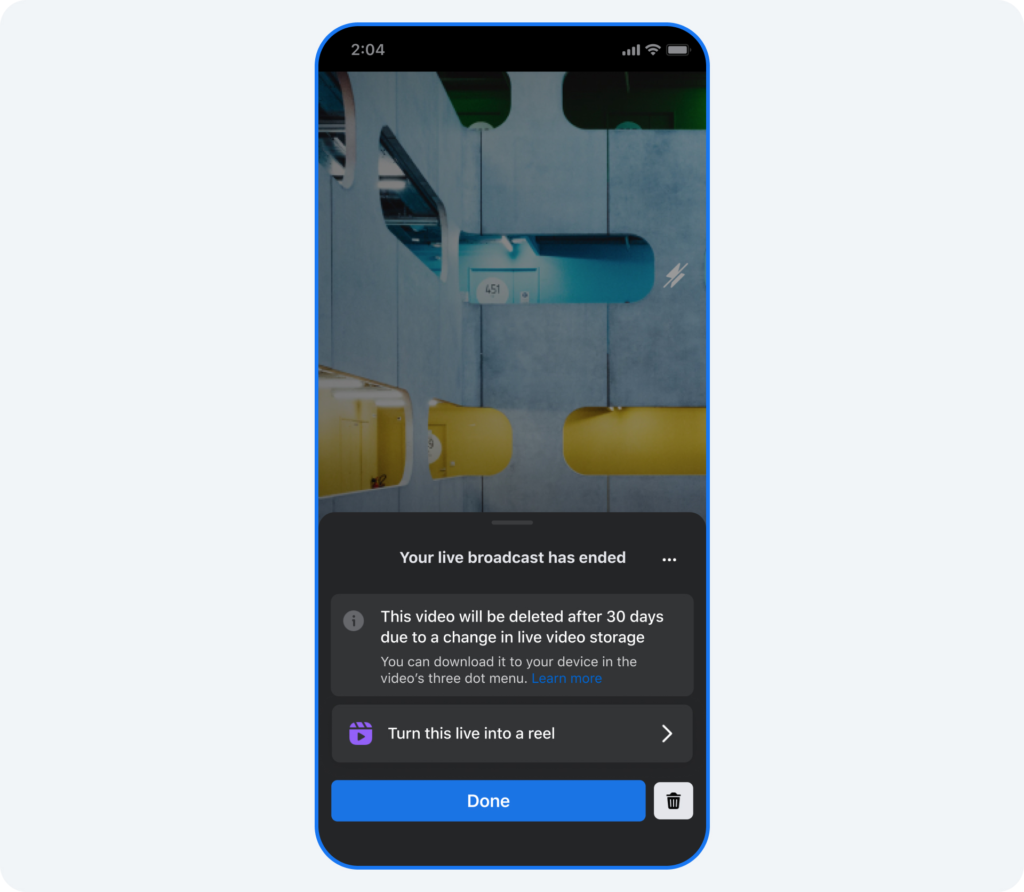
- If you don’t want to lose your videos, you can convert them into Reels.
- You can clip shorter moments from your live video (up to 90 seconds) and post them as Reels.
- This way, your best moments stay on Facebook even after 30 days.
Need More Time? Extend the Deadline
If you don’t have time to download your videos right now, Facebook allows you to postpone the deletion for six months.

- Open the notification.
- Click “Learn More”.
- Select “Postpone the deletion”.
- Confirm by clicking “Postpone”.
Why This Matters for Creators
If you use Facebook Live for business, marketing, or personal content, this change is important. You now have to actively save your videos before they disappear. This also means Reels will become more important, as Facebook is pushing users to share short-form content.
Conclusion
Facebook’s live video storage update starts on February 19, so be sure to download or transfer your old videos before they get deleted. If you want more time, use the postpone option.
By planning ahead, you won’t lose your content—and you might even find new ways to repurpose your live videos as Reels!
What do you think about this update? Let us know in the comments!